<!DOCTYPE html>
    <html lang="vi" xmlns="http://www.w3.org/1999/xhtml" prefix="og: http://ogp.me/ns#">
    <head>
<title>4.1 Chọn và áp dụng giấy phép CC</title>
<meta name="description" content="4.1 Chọn và áp dụng giấy phép CC - Savefile - Blogs - https&#x3A;&#x002F;&#x002F;letrungnghia.mangvn.org&#x002F;savefile&#x002F;CC&#x002F;4-1-chon-va-ap-dung-giay-phep-cc-7385.html">
<meta name="author" content="Blog FOSS by Lê Trung Nghĩa">
<meta name="copyright" content="Blog FOSS by Lê Trung Nghĩa [webmaster@vinades.vn]">
<meta name="generator" content="NukeViet v4.5">
<meta http-equiv="Content-Type" content="text/html; charset=utf-8">
<meta property="og:title" content="4.1 Chọn và áp dụng giấy phép CC">
<meta property="og:type" content="website">
<meta property="og:description" content="Savefile - Blogs - https&#x3A;&#x002F;&#x002F;letrungnghia.mangvn.org&#x002F;savefile&#x002F;CC&#x002F;4-1-chon-va-ap-dung-giay-phep-cc-7385.html">
<meta property="og:site_name" content="Blog FOSS by Lê Trung Nghĩa">
<meta property="og:url" content="https://letrungnghia.mangvn.org/savefile/CC/4-1-chon-va-ap-dung-giay-phep-cc-7385.html">
<link rel="shortcut icon" href="https://letrungnghia.mangvn.org/favicon.ico">
<link rel="canonical" href="https://letrungnghia.mangvn.org/savefile/CC/4-1-chon-va-ap-dung-giay-phep-cc-7385.html">
<link rel="alternate" href="https://letrungnghia.mangvn.org/rss/" title="Blogs" type="application/rss+xml">
<link rel="alternate" href="https://letrungnghia.mangvn.org/rss/Government/" title="Blogs - Government" type="application/rss+xml">
<link rel="alternate" href="https://letrungnghia.mangvn.org/rss/Policy/" title="Blogs - Policy" type="application/rss+xml">
<link rel="alternate" href="https://letrungnghia.mangvn.org/rss/Philosophy/" title="Blogs - Philosophy" type="application/rss+xml">
<link rel="alternate" href="https://letrungnghia.mangvn.org/rss/Security/" title="Blogs - Security" type="application/rss+xml">
<link rel="alternate" href="https://letrungnghia.mangvn.org/rss/Legal/" title="Blogs - Legal" type="application/rss+xml">
<link rel="alternate" href="https://letrungnghia.mangvn.org/rss/Education/" title="Blogs - Education" type="application/rss+xml">
<link rel="alternate" href="https://letrungnghia.mangvn.org/rss/Business/" title="Blogs - Business" type="application/rss+xml">
<link rel="alternate" href="https://letrungnghia.mangvn.org/rss/Community/" title="Blogs - Community" type="application/rss+xml">
<link rel="alternate" href="https://letrungnghia.mangvn.org/rss/Interoperability/" title="Blogs - Interoperability" type="application/rss+xml">
<link rel="alternate" href="https://letrungnghia.mangvn.org/rss/Standards/" title="Blogs - Standards" type="application/rss+xml">
<link rel="alternate" href="https://letrungnghia.mangvn.org/rss/Author/" title="Blogs - Author" type="application/rss+xml">
<link rel="alternate" href="https://letrungnghia.mangvn.org/rss/Opinions/" title="Blogs - Opinions" type="application/rss+xml">
<link rel="alternate" href="https://letrungnghia.mangvn.org/rss/CC/" title="Blogs - CC" type="application/rss+xml">
<link rel="alternate" href="https://letrungnghia.mangvn.org/rss/Cloud/" title="Blogs - Cloud" type="application/rss+xml">
<link rel="alternate" href="https://letrungnghia.mangvn.org/rss/Hardware/" title="Blogs - Hardware" type="application/rss+xml">
<link rel="alternate" href="https://letrungnghia.mangvn.org/rss/Software/" title="Blogs - Software" type="application/rss+xml">
<link rel="alternate" href="https://letrungnghia.mangvn.org/rss/Statistics/" title="Blogs - Statistics" type="application/rss+xml">
<link rel="alternate" href="https://letrungnghia.mangvn.org/rss/Trends/" title="Blogs - Trends" type="application/rss+xml">
<link rel="alternate" href="https://letrungnghia.mangvn.org/rss/China/" title="Blogs - China" type="application/rss+xml">
<link rel="alternate" href="https://letrungnghia.mangvn.org/rss/OSs/" title="Blogs - OSs" type="application/rss+xml">
<link rel="alternate" href="https://letrungnghia.mangvn.org/rss/Blogs/" title="Blogs - Blogs" type="application/rss+xml">
<link rel="alternate" href="https://letrungnghia.mangvn.org/rss/Outsourcing/" title="Blogs - Outsourcing" type="application/rss+xml">
<link rel="alternate" href="https://letrungnghia.mangvn.org/rss/elearning/" title="Blogs - Elearning" type="application/rss+xml">
<link rel="preload" as="style" href="https://letrungnghia.mangvn.org/assets/css/font-awesome.min.css" type="text/css">
<link rel="preload" as="style" href="https://letrungnghia.mangvn.org/themes/default/css/bootstrap.non-responsive.css" type="text/css">
<link rel="preload" as="style" href="https://letrungnghia.mangvn.org/themes/default/css/style.css" type="text/css">
<link rel="preload" as="style" href="https://letrungnghia.mangvn.org/themes/default/css/style.non-responsive.css" type="text/css">
<link rel="preload" as="style" href="https://letrungnghia.mangvn.org/themes/default/css/news.css" type="text/css">
<link rel="preload" as="style" href="https://letrungnghia.mangvn.org/themes/default/css/custom.css" type="text/css">
<link rel="preload" as="style" href="https://letrungnghia.mangvn.org/assets/css/default.vi.1106.css" type="text/css">
<link rel="preload" as="script" href="https://letrungnghia.mangvn.org/assets/js/jquery/jquery.min.js" type="text/javascript">
<link rel="preload" as="script" href="https://letrungnghia.mangvn.org/assets/js/language/vi.js" type="text/javascript">
<link rel="preload" as="script" href="https://letrungnghia.mangvn.org/assets/js/DOMPurify/purify3.js" type="text/javascript">
<link rel="preload" as="script" href="https://letrungnghia.mangvn.org/assets/js/global.js" type="text/javascript">
<link rel="preload" as="script" href="https://letrungnghia.mangvn.org/assets/js/site.js" type="text/javascript">
<link rel="preload" as="script" href="https://letrungnghia.mangvn.org/themes/default/js/news.js" type="text/javascript">
<link rel="preload" as="script" href="https://letrungnghia.mangvn.org/themes/default/js/main.js" type="text/javascript">
<link rel="preload" as="script" href="https://letrungnghia.mangvn.org/themes/default/js/custom.js" type="text/javascript">
<link rel="preload" as="script" href="https://letrungnghia.mangvn.org/themes/default/js/bootstrap.min.js" type="text/javascript">
<link rel="stylesheet" href="https://letrungnghia.mangvn.org/assets/css/font-awesome.min.css">
<link rel="stylesheet" href="https://letrungnghia.mangvn.org/themes/default/css/bootstrap.non-responsive.css">
<link rel="stylesheet" href="https://letrungnghia.mangvn.org/themes/default/css/style.css">
<link rel="stylesheet" href="https://letrungnghia.mangvn.org/themes/default/css/style.non-responsive.css">
<link rel="StyleSheet" href="https://letrungnghia.mangvn.org/themes/default/css/news.css">
<link rel="stylesheet" href="https://letrungnghia.mangvn.org/themes/default/css/custom.css">
<link rel="stylesheet" href="https://letrungnghia.mangvn.org/assets/css/default.vi.1106.css">
<style type="text/css">
	body{background: #fff;}
</style>
<script>(function(i,s,o,g,r,a,m){i['GoogleAnalyticsObject']=r;i[r]=i[r]||function(){
(i[r].q=i[r].q||[]).push(arguments)},i[r].l=1*new Date();a=s.createElement(o),
m=s.getElementsByTagName(o)[0];a.async=1;a.src=g;m.parentNode.insertBefore(a,m)
})(window,document,'script','https://www.google-analytics.com/analytics.js','ga');
ga('create', 'UA-70254229-3', '');
ga('send', 'pageview');
</script>
</head>
    <body>
<div id="print">
	<div id="hd_print">
		<h2 class="pull-left">Blog FOSS by Lê Trung Nghĩa</h2>
		<p class="pull-right"><a title="Blog FOSS by Lê Trung Nghĩa" href="https://letrungnghia.mangvn.org/">https://letrungnghia.mangvn.org</a></p>
	</div>
	<div class="clear"></div>
	<hr />
	<div id="content">
		<h1>4.1 Chọn và áp dụng giấy phép CC</h1>
		<ul class="list-inline">
			<li>Thứ ba - 16/04/2024 05:43</li>
			<li class="hidden-print txtrequired"><em class="fa fa-print">&nbsp;</em><a title="In ra" href="javascript:;" onclick="window.print()">In ra</a></li>
			<li class="hidden-print txtrequired"><em class="fa fa-power-off">&nbsp;</em><a title="Đóng cửa sổ này" href="javascript:;" onclick="window.close()">Đóng cửa sổ này</a></li>
		</ul>
		<div class="clear"></div>
		<div id="hometext">
		</div>
				<div class="imghome">
			<img alt="4.1 Chọn và áp dụng giấy phép CC" src="https://letrungnghia.mangvn.org/uploads/letrungnghia/news/2024/cc-by_1.png" width="460" class="img-thumbnail" />
		</div>
		<div class="clear"></div>
		<div id="bodytext" class="clearfix">
			<p align="justify"><b><span style="background: rgb(255, 255, 0);">4.1 Choosing and Applying a CC License</span></b></p>

<p align="justify">Theo: <a href="https://certificates.creativecommons.org/cccertedu/chapter/4-1-choosing-and-applying-a-cc-license/">https://certificates.creativecommons.org/cccertedu/chapter/4-1-choosing-and-applying-a-cc-license/</a></p>

<p align="justify">Hành động áp dụng giấy phép CC là dễ dàng, nhưng có vài cân nhắc quan trọng để suy nghĩ trước khi bạn làm.</p>

<p align="justify"><img alt="" height="35" src="https://letrungnghia.mangvn.org/uploads/letrungnghia/news/2024/cc-by_1.png" width="100" /></p>

<p align="justify"><a href="https://creativecommons.org/about/downloads"><b>Biểu tượng giấy phép CC BY</b></a><span style="font-weight: normal">.</span><b> <a href="https://creativecommons.org/policies#trademark">Thương hiệu</a>: </b><span style="font-weight: normal">Creative Commons.</span><b> </b></p>

<p align="justify"><b>Kết quả học tập</b></p>

<ul>
	<li>
	<p align="justify" style="font-weight: normal">Nêu các cân nhắc quan trọng nhất trước khi áp dụng một giấy phép CC hoặc CC0</p>
	</li>
	<li>
	<p align="justify"><span style="font-weight: normal">Áp dụng một giấy phép bằng việc sử dụng bộ chọn giấy phép CC </span><span style="font-weight: normal">(CC License Chooser) và CC0 bằng việc sử dụng Hiến tặng vào phạm vi công cộng của CC</span></p>
	</li>
	<li>
	<p align="justify" style="font-weight: normal">Đánh giá giấy phép nào để áp dụng dựa trên các yếu tố có liên quan</p>
	</li>
</ul>

<p align="justify"><b>Câu hỏi lớn / Vì sao nó lại quan trọng</b></p>

<p align="justify" style="font-weight: normal">Bạn nên cân nhắc điều gì trước khi áp dụng một giấy phép CC hoặc CC0 cho tác phẩm của bạn? Có vài lựa chọn để chọn từ đó. Cũng có nhiều điều để suy nghĩ trước khi áp dụng bất kỳ giấy phép CC nào hay CC0, bao gồm việc liệu bạn có tất cả các quyền bạn cần hay không, và nếu không, bản phải chỉ ra điều đó như thế nào cho công chúng.</p>

<p align="justify"><b><span style="background: transparent">Suy ngẫm cá nhân/Tại sao điều đó lại quan trọng với bạn</span></b></p>

<p align="justify" style="font-weight: normal"><span style="background: transparent">Bạn sẽ chọn một giấy phép CC cụ thể cho tác phẩm của mình như thế nào? Bạn có biết cách thực sự gắn giấy phép vào tác phẩm của mình sau khi bạn đã chọn giấy phép không? Điều gì sẽ xảy ra nếu bạn thay đổi ý định về giấy phép?</span></p>

<p align="justify"><b><span style="background: transparent">Có được kiến thức cơ bản</span></b></p>

<p align="justify" style="font-weight: normal"><span style="background: transparent">Trước khi bạn quyết định bạn muốn áp dụng một giấy phép Creative Commons hoặc CC0 cho tác phẩm sáng tạo của bạn, có vài điều quan trọng cần cân nhắc: </span></p>

<p align="justify"><i><b>Các giấy phép và CC0 là không thể hủy ngang.</b></i></p>

<p align="justify">Không thể hủy ngang có nghĩa là một thỏa thuận pháp lý không thể bị hủy bỏ. Điều đó có nghĩa là khi bạn áp dụng giấy phép CC cho một tác phẩm, giấy phép CC đó sẽ áp dụng cho tác phẩm đó cho đến khi bản quyền của tác phẩm đó hết hạn. Khía cạnh này của việc cấp phép CC là rất được mong muốn từ góc độ của những người sử dụng lại vì họ tin tưởng khi biết rằng người sáng tạo không thể tùy tiện rút lại các quyền đã được cấp cho họ theo giấy phép CC.</p>

<p align="justify">Vì các giấy phép là không thể thu hồi được nên điều rất quan trọng là phải cân nhắc cẩn thận các lựa chọn trước khi quyết định sử dụng giấy phép CC cho một tác phẩm.</p>

<p align="justify"><i><b><span style="background: transparent">Bạn phải sở hữu hoặc kiểm soát bản quyền trong tác phẩm.</span></b></i></p>

<p align="justify">Bạn nên kiểm soát bản quyền đối với tác phẩm mà bạn áp dụng giấy phép. Ví dụ, bạn không sở hữu hoặc kiểm soát bất kỳ bản quyền nào đối với tác phẩm <a href="https://creativecommons.org/faq/#may-i-apply-a-creative-commons-license-to-a-work-in-the-public-domain"><b>thuộc phạm vi công cộng</b></a>, và bạn không sở hữu hoặc kiểm soát bản quyền đối với <a href="https://creativecommons.org/faq/#may-i-apply-a-creative-commons-license-to-a-work-in-the-public-domain"><b>bài hát của Enrique </b><u><b>I</b></u><b>glesias</b></a>. Hơn nữa, nếu bạn tạo ra tài liệu trong phạm vi công việc của mình, bạn có thể không phải là người nắm giữ các quyền và có thể cần phải xin phép chủ lao động của mình trước khi áp dụng giấy phép CC. Trước khi cấp phép, hãy lưu ý xem bạn có bản quyền đối với tác phẩm mà bạn đang áp dụng giấy phép CC hay không. Hãy tới <a href="https://certificates.creativecommons.org/cccertedu/chapter/2-1-copyright-basics/"><b>Bài 2.1</b></a> để xem lại Thông tin cơ bản về Bản quyền.</p>

<p align="justify"><i><b>Tôi nên sử dụng giấy phép Creative Commons nào?</b></i></p>

<p align="justify">Sáu giấy phép Creative Commons cung cấp một loạt các lựa chọn cho những người sáng tạo muốn chia sẻ tác phẩm của họ với công chúng trong khi vẫn giữ được bản quyền. Những người sáng tạo có thể xác định xem họ có muốn công chúng tùy chỉnh tác phẩm của họ hay không và nếu có thì theo những điều kiện nào. Cách tốt nhất để quyết định giấy phép nào phù hợp với bạn là suy nghĩ về lý do tại sao bạn muốn chia sẻ và bạn hy vọng người khác sẽ sử dụng tác phẩm của bạn như thế nào.</p>

<p align="justify">Ví dụ, đây là vài câu hỏi để cân nhắc:</p>

<ul>
	<li>
	<p align="justify">Bạn có muốn người khác sử dụng tác phẩm của bạn ở dạng nguyên bản, hay họ có thể điều chỉnh và đổi mới dựa trên tác phẩm của bạn, dịch nó sang các ngôn ngữ khác hoặc tùy chỉnh nó để đáp ứng tốt hơn nhu cầu của họ?</p>
	</li>
	<li>
	<p align="justify">Tất cả việc sử dụng lại tác phẩm của bạn có được chấp nhận không, hay bạn cần hạn chế việc sử dụng lại theo những cách thức nhất định? Ví dụ, có thể bạn chỉ muốn cho phép sử dụng tác phẩm của mình vào mục đích phi thương mại, hoặc bạn muốn đảm bảo rằng các bản tùy chỉnh cũng được chia sẻ với các quyền tương tự như bản gốc.</p>
	</li>
	<li>
	<p align="justify">Bạn có muốn từ bỏ tất cả các quyền đối với tác phẩm của mình để mọi người trên thế giới có thể sử dụng nó cho bất kỳ mục đích nào không? Sau đó hãy nghĩ đến việc sử dụng công cụ hiến tặng vào phạm vi công cộng, CC0, thay vì một trong sáu giấy phép CC.</p>
	</li>
	<li>
	<p align="justify">Các câu hỏi bổ sung bạn có thể cân nhắc liên quan đến nền tảng để tái sử dụng.</p>

	<ul>
		<li>
		<p align="justify">Có là quan trọng đối với bạn khi hình ảnh của bạn có thể được kết hợp vào Wikipedia không? Nếu vậy, bạn nên chọn CC BY, BY-SA hoặc CC0, vì Wikipedia không cho phép hình ảnh được cấp phép theo bất kỳ giấy phép Phi thương mại hoặc Không có phái sinh nào ngoại trừ một số trường hợp hạn chế.</p>
		</li>
	</ul>
	</li>
</ul>

<p align="justify">Nếu bạn cần trợ giúp để quyết định giấy phép hoặc công cụ nào có thể là tốt nhất cho bạn, CC cung cấp <b>Bộ chọn Giấy phép CC</b><b><span style="background: transparent"> </span></b><b><span style="background: transparent">(<a href="https://chooser-beta.creativecommons.org/">CC License Chooser</a>)</span></b>. Hãy dành chút thời gian để thử nghiệm với bộ chọn giấy phép CC ngay bây giờ. Sau khi bạn chọn các hộp cho biết tùy chọn của mình, bộ chọn sẽ tạo giấy phép hoặc công cụ thích hợp dựa trên các lựa chọn của bạn. Hãy nhớ rằng, bộ chọn giấy phép không phải là một trang đăng ký, nó chỉ cung cấp cho bạn các biểu tượng, ngôn ngữ giấy phép được tiêu chuẩn hóa và mã HTML mà bạn có thể sao chép/dán vào tác phẩm hoặc trang web của mình.</p>

<p align="justify">Video: <a href="https://www.youtube.com/watch?v=1KoRRR53uqI"><b>Đoạn </b></a><a href="https://www.youtube.com/watch?v=1KoRRR53uqI"><b>video demo bộ chọn giấy phép CC</b></a></p>

<p align="justify"><i><b>Tôi áp dụng một giấy phép CC cho tác phẩm của tôi như thế nào?</b></i></p>

<p align="justify">Một khi bạn đã quyết định muốn sử dụng giấy phép CC và biết giấy phép nào bạn muốn sử dụng, việc áp dụng nó rất đơn giản. <b>Về mặt kỹ thuật, bạn chỉ cần chỉ ra giấy phép CC nào bạn đang áp dụng cho tác phẩm của mình. Tuy nhiên, chúng tôi đặc biệt khuyên bạn nên đưa vào một liên kết (hoặc viết ra URL giấy phép CC, nếu bạn đang làm việc ngoại tuyến) tới chứng thư giấy phép CC có liên quan</b> (ví dụ: <a href="https://creativecommons.org/licenses/by/4.0"><b>https://creativecommons.org/licenses/by/4.0</b></a>). Bạn có thể thực hiện việc này trong <a href="https://en.wikipedia.org/wiki/Copyright_notice"><b>thông báo bản quyền</b></a> cho tác phẩm của mình, ở chân trang của trang web hoặc bất kỳ nơi nào khác phù hợp với định dạng và phương tiện cụ thể của tác phẩm của bạn. Điều quan trọng là làm rõ giấy phép CC bao gồm những gì và đặt thông báo ở nơi làm cho điều đó rõ ràng với công chúng. Xem <a href="https://wiki.creativecommons.org/wiki/Marking_your_work_with_a_CC_license"><b>Đánh dấu tác phẩm của bạn bằng giấy phép CC</b></a> để biết thêm thông tin. Lưu ý: chúng tôi có các đề xuất bổ sung cho tuyên bố cấp phép trong phần Ghi công bên dưới.</p>

<p align="justify">Việc chỉ ra giấy phép CC nào bạn chọn có thể đơn giản như lưu ý này từ chân trang của <a href="https://open.bccampus.ca/find-open-textbooks/"><b>Sách giáo kho</b></a><a href="https://open.bccampus.ca/find-open-textbooks/"><u><b>a</b></u></a><a href="https://open.bccampus.ca/find-open-textbooks/"><b> Mở của BC</b></a>.</p>

<p align="justify"><img alt="" height="35" src="https://letrungnghia.mangvn.org/uploads/letrungnghia/news/2024/cc-by_2.png" width="100" /></p>

<p align="justify">Ngoại trừ những nơi được nêu khác, nội dung trên trang này được cấp <a href="https://creativecommons.org/licenses/by/4.0/"><b>giấy phép </b></a><a href="https://creativecommons.org/licenses/by/4.0/"><b>Creative Commons Ghi công 4.0 Quốc tế </b></a></p>

<p align="justify">Các nền tảng phổ biến như YouTube, Medium và Flickr có xu hướng có các cơ chế đánh dấu giấy phép CC được xây dựng sẵn của riêng chúng. Đáng lưu ý: ngay cả các nền tảng chủ chốt đó có thể có sự không chính xác trong các mô tả của chúng về cấp phép CC hoặc hạn chế tới những gì có thể được cấp phép và như thế nào</p>

<p align="justify">Đây là một vài khuyến nghị, khi cấp phép cho các tác phẩm của bạn trên các nền tảng khác nhau:</p>

<ul>
	<li>
	<p align="justify">Nếu có thể, hãy đảm bảo giấy phép của bạn có đường liên kết hoạt động với giấy phép tương ứng trên <a href="http://creativecommons.org/"><b>Creativecommons.org</b></a>.</p>
	</li>
	<li>
	<p align="justify">Chỉ rõ URL của giấy phép bạn chọn cho các định dạng chỉ có hình ảnh, chẳng hạn như đồ họa thông tin.</p>
	</li>
	<li>
	<p align="justify">Thêm “đoạn đệm” hoặc đoạn ngắn ở đầu hoặc cuối video có tuyên bố cấp phép của bạn. Xem <a href="https://wiki.creativecommons.org/wiki/Video_bumper_guidelines"><b>chỉ dẫn đoạn quảng cáo đệm video</b></a> của CC và <a href="https://vimeo.com/showcase/5791214"><b>các ví dụ về đoạn quảng cáo đệm CC</b></a>.</p>
	</li>
	<li>
	<p align="justify" style="font-weight: normal">Đọc to các tuyên bố cấp phép, với cả các URL, ở định dạng chỉ có âm thanh.</p>
	</li>
</ul>

<p align="justify">Có những nền tảng quan trọng và phổ biến khác được xây dựng cho khoa học công dân, như <a href="https://www.inaturalist.org/"><b>iNaturalist</b></a>, nơi bạn cũng có thể chọn giấy phép nào để sử dụng và tìm kiếm hình ảnh được cấp phép theo giấy phép CC. Các kho lưu trữ dành cho bản trước khi in (Pre-print) như <a href="https://zenodo.org/"><b>Zenodo</b></a> cũng có các chức năng được xây dựng sẵn để bạn chọn giấy phép. <a href="https://commons.wikimedia.org/wiki/Main_Page"><b>Wikimedia Commons</b></a> cũng cho phép bạn chọn giấy phép của riêng mình thông qua hệ thống được xây dựng sẵn của họ, nhưng nó chỉ giới hạn ở những giấy phép mà các dự án Wikimedia chấp nhận.</p>

<p align="justify">Theo nguyên tắc chung, bất cứ khi nào bạn quyết định cách áp dụng giấy phép CC của mình, điều quan trọng cần nhớ là các giấy phép CC được thiết kế dành cho người sử dụng trong tương lai. Bạn muốn giúp người sử dụng trong tương lai dễ dàng hiểu được những điều khoản áp dụng để họ sử dụng tác phẩm của bạn. Vì vậy, bất cứ khi nào bạn áp dụng giấy phép CC, hãy làm cho tuyên bố cấp phép của bạn dễ tìm và dễ hiểu. Hãy cân nhắc việc đưa vào thông tin bổ sung mà người sử dụng trong tương lai có thể cần để cung cấp thông tin ghi công tốt cho tác phẩm của bạn, chẳng hạn như ngày tạo, tên và tiêu đề cho tác phẩm của bạn. Thông tin thêm về ghi công ở bên dưới.</p>

<p align="justify">Để biết ví dụ về giấy phép CC được áp dụng cho các sáng tạo khác nhau, từ video, trang web đến tài liệu ngoại tuyến, hãy xem <a href="https://wiki.creativecommons.org/wiki/Marking_your_work_with_a_CC_license"><b>CC Wiki này về Đánh dấu tác phẩm của bạn bằng giấy phép CC</b></a>.</p>

<p align="justify">Nếu bạn muốn đánh dấu tác phẩm theo cách khác hoặc cần sử dụng định dạng khác như đóng tiêu đề trong video, bạn có thể đi tới <a href="https://creativecommons.org/about/downloads/"><b>https://creativecommons.org/about/downloads/</b></a> và truy cập các phiên bản có thể tải xuống của tất cả các biểu tượng CC .</p>

<p align="justify"><b>Ghi công </b></p>

<p align="justify"><b>Trao và nhận sự thừa nhận cho tác phẩm sáng tạo </b></p>

<p align="justify">Một khía cạnh quan trọng của các giấy phép CC là ghi công. Trong khi chúng tôi thừa nhận có các thực hành khác nhau được khuyến nghị trong các cộng đồng thực hành khác nhau, CC gợi ý cách tiếp cận “TASL” sau đây cho các thực hành ghi công (cả để đánh dấu tác phẩm của bạn, và cung cấp thừa nhận ghi công cho những người khác):</p>

<ul>
	<li>
	<p align="justify"><b>T</b><span style="font-weight: normal"> (Title) = Tiêu đề </span></p>
	</li>
	<li>
	<p align="justify"><b>A</b><span style="font-weight: normal"> (Author) = Tác giả (nói cho người sử dụng lại thừa nhận ghi công cho ai)</span></p>
	</li>
	<li>
	<p align="justify"><b>S</b><span style="font-weight: normal"> (Source) = Nguồn (cung cấp cho người sử dụng đường liên kết tới nguồn đó) </span></p>
	</li>
	<li>
	<p align="justify"><b>L</b><span style="font-weight: normal"> (License) = Giấy phép (</span><span style="font-weight: normal">đường liên kết tới chứng thư của giấy phép CC đó) </span></p>
	</li>
</ul>

<p align="justify">Nếu bạn cung cấp thông tin này khi chia sẻ tác phẩm của mình, những người khác có thể dễ dàng khám phá, sử dụng lại và thừa nhận ghi công cho tác phẩm của bạn. Xin nhắc lại: để biết thêm ví dụ về cách đánh dấu tác phẩm của riêng bạn trong các ngữ cảnh khác nhau, hãy dành chút thời gian xem qua <a href="https://wiki.creativecommons.org/wiki/Marking_your_work_with_a_CC_license"><b>trang đánh dấu mở rộng của CC</b></a>. Bạn cũng có thể xem các ví dụ và thực tiễn được đề xuất để ghi công trên <a href="https://wiki.creativecommons.org/wiki/best_practices_for_attribution"><b>wiki Thực hành tốt nhất về ghi công của chúng tôi</b></a>.</p>

<p align="justify"><b>Ghi công cho tác phẩm của người khác</b></p>

<p align="justify">Nếu bạn đang sử dụng tác phẩm của người khác trong tác phẩm của mình, bạn cũng phải thừa nhận ghi công cho những tác phẩm đó trong tác phẩm của chính mình.</p>

<p align="justify">Khi cung cấp ghi công, thực hành được khuyến nghị là đánh dấu tác phẩm bằng thông tin TASL đầy đủ. Khi bạn không có một số thông tin TASL về một tác phẩm, hãy cố gắng hết sức có thể và đưa càng nhiều chi tiết càng tốt vào tuyên bố đánh dấu đó.</p>

<p align="justify">Lưu ý rằng bắt đầu với Phiên bản 4.0, các giấy phép không còn yêu cầu người sử dụng lại đưa tiêu đề vào như một phần của tuyên bố ghi công. Tuy nhiên, nếu tiêu đề được cung cấp thì CC khuyến khích bạn đưa nó vào khi ghi công cho tác giả.</p>

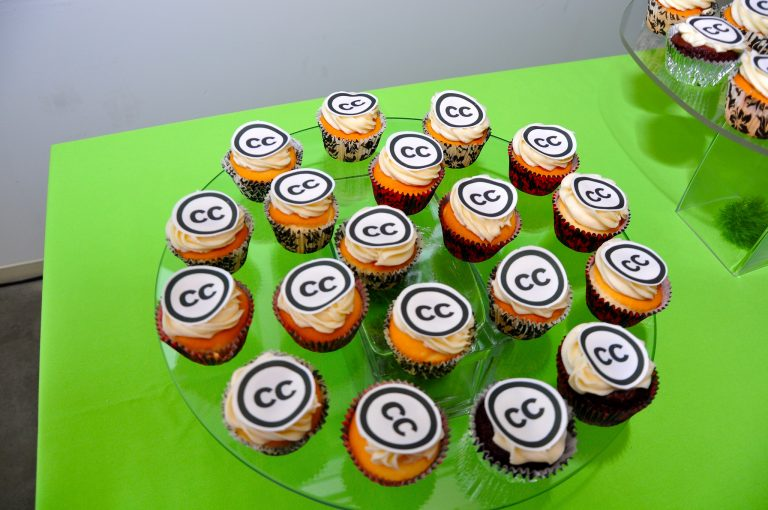
<p align="justify">Xem ví dụ bên dưới về đánh dấu một hình ảnh với thông tin TASL. Hình ảnh sau đây là một ví dụ tốt về đánh dấu CC vì TASL với tất cả các đường liên kết đúng cách được cung cấp trong tuyên bố ghi công.</p>

<div class="image-center"><img alt="" height="510" src="https://letrungnghia.mangvn.org/uploads/letrungnghia/news/2024/4.1_h1.png" width="768" /></div>

<p style="text-align: center;">Kỷ niệm sinh nhật lần thứ 10 Creative Commons ở San Francisco, của <a href="https://www.flickr.com/photos/sixteenmilesofstring/"><b>tvol</b></a>. <a href="https://creativecommons.org/licenses/by/2.0/"><b>CC BY 2.0</b></a></p>

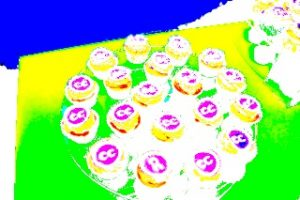
<p align="justify"><b>Chỉ ra liệu tác phẩm của bạn có dựa vào tác phẩm của ai đó khác hay không</b> - Nếu tác phẩm của bạn là một sửa đổi hoặc tùy chỉnh của một tác phẩm khác, hãy chỉ ra điều này và cung cấp ghi công cho nhà sáng tạo tác phẩm gốc đó. Bạn cũng nên đưa vào một đường liên kết tới tác phẩm bạn đã sửa và chỉ ra giấy phép nào áp dụng cho tác phẩm đó.</p>

<p align="justify">Ví dụ ở đây:</p>

<div class="image-center"><img alt="" height="200" src="https://letrungnghia.mangvn.org/uploads/letrungnghia/news/2024/4.1_h2.png" width="300" /></div>

<p align="justify">Tác phẩm này, “90fied”, là dẫn xuất của “Kỷ niệm sinh nhật lần thứ 10 Creative Commons ở San Francisco” của tvol“90fied”, được sử dụng theo giấy phép CC“90fied”, BY. “90fied” được cấp giấy phép CC BY từ &#91;Tên của bạn ở đây&#93;</p>

<p align="justify">Đánh dấu tác phẩm được những người khác tạo ra mà bạn đang kết hợp vào tác phẩm của riêng bạn</p>

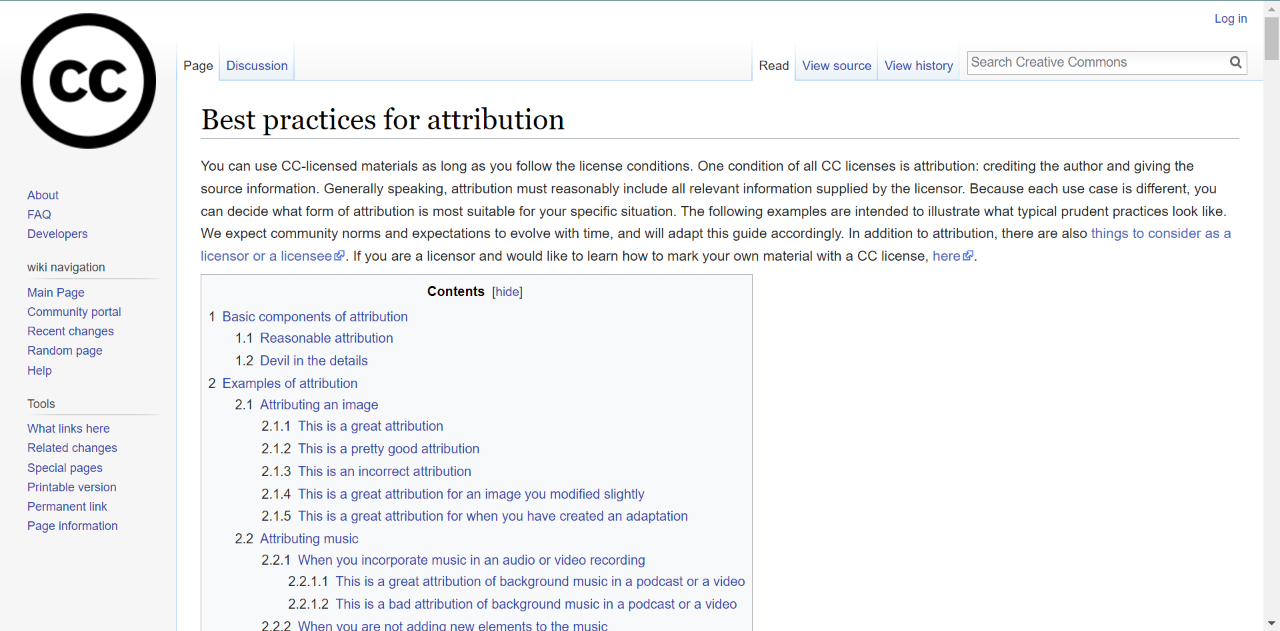
<p align="justify">Các ví dụ trên <a href="https://wiki.creativecommons.org/wiki/best_practices_for_attribution"><b>wiki Thực hành Tốt nhất về Ghi công của chúng tôi</b></a>:</p>

<div class="image-center"><img alt="" height="385" src="https://letrungnghia.mangvn.org/uploads/letrungnghia/news/2024/4.1_h3.png" width="781" /></div>

<p align="justify">Trong mọi trường hợp, mục tiêu đều giống nhau: bạn muốn giúp người khác dễ dàng biết ai đã tạo ra phần nào của tác phẩm. (1) Xác định các điều khoản mà theo đó bất kỳ tác phẩm cụ thể nào hoặc một phần của tác phẩm có thể được sử dụng. (2) Cung cấp thông tin về tác phẩm bạn đã sử dụng để tạo ra tác phẩm mới của bạn hoặc đã kết hợp vào tác phẩm của bạn.</p>

<p align="justify">Khi áp dụng giấy phép CC cho một tác phẩm: 1) Hãy sử dụng Bộ chọn giấy phép CC để xác định giấy phép CC nào đáp ứng tốt nhất nhu cầu của bạn. Áp dụng mã giấy phép nếu có thể hoặc sao chép/dán văn bản và các liên kết được cung cấp. 2) Nếu bạn đang sử dụng nền tảng trên trực tuyến, hãy sử dụng các công cụ cấp phép CC được xây dựng sẵn để đánh dấu tác phẩm của bạn bằng một giấy phép CC. 3) Hãy đánh dấu tác phẩm của bạn và ghi nhận công xứng đáng cho tác phẩm của người khác bằng cách sử dụng cách tiếp cận TASL.</p>

<p align="justify">Không có câu trả lời duy nhất cho giấy phép CC nào là tốt nhất. Điều quan trọng là phải nhớ tại sao bạn chia sẻ và bạn hy vọng người khác có thể làm gì với tác phẩm của bạn, trước khi đưa ra lựa chọn giấy phép CC.</p>

<p align="justify"><span style="background: transparent">-----------------------------------------------------------------------</span></p>

<p align="justify"><b>Giấy phép và Ghi công</b></p>

<p align="justify"><b>Nội dung được cấp phép CC, Bản gốc</b></p>

<ul>
	<li>
	<p align="justify"><b>Được cung cấp bởi</b>: Creative Commons. <b>Giấy phép</b> <em><a href="https://creativecommons.org/licenses/by/4.0/">CC BY: </a></em><em><a href="https://creativecommons.org/licenses/by/4.0/"><i><u>Ghi công</u></i></a></em></p>
	</li>
</ul>
&nbsp;

<p align="justify" style="font-weight: normal"><span style="background: rgb(255, 255, 0);">The act of applying a CC license is easy, but there are several important considerations to think through before you do.</span></p>

<p align="justify"><a href="https://creativecommons.org/about/downloads"><b><span style="background: rgb(255, 255, 0);">CC BY License Icon</span></b></a><span style="background: rgb(255, 255, 0);">. </span><a href="https://creativecommons.org/policies#trademark"><b><span style="background: rgb(255, 255, 0);">Trademark</span></b></a><span style="background: rgb(255, 255, 0);">: Creative Commons.</span></p>

<p align="justify"><b><span style="background: rgb(255, 255, 0);">Learning Outcomes</span></b></p>

<ul>
	<li>
	<p align="justify"><span style="background: rgb(255, 255, 0);">Name the most important considerations before applying a CC license or CC0</span></p>
	</li>
	<li>
	<p align="justify"><span style="background: rgb(255, 255, 0);">Apply a license using CC’s License Chooser and CC0 using CC’s Public Domain Dedication</span></p>
	</li>
	<li>
	<p align="justify"><span style="background: rgb(255, 255, 0);">Evaluate which license to apply based on relevant factors</span></p>
	</li>
</ul>

<p align="justify"><b><span style="background: rgb(255, 255, 0);">Big Question / Why It Matters</span></b></p>

<p align="justify"><span style="background: rgb(255, 255, 0);">What should you consider before applying a CC license or CC0 to your work? There are several options from which to choose. There are also many things to think about before applying any CC license or CC0, including whether you have all the rights you need and, if not, how you must indicate that to the public.</span></p>

<p align="justify"><b><span style="background: rgb(255, 255, 0);">Personal Reflection / Why it Matters To You</span></b></p>

<p align="justify"><span style="background: rgb(255, 255, 0);">How would you go about choosing a particular CC license for your work? Do you know how to go about actually attaching a license to your work once you have chosen one? What if you change your mind about the license?</span></p>

<p align="justify"><b><span style="background: rgb(255, 255, 0);">Acquiring Essential Knowledge</span></b></p>

<p align="justify"><span style="background: rgb(255, 255, 0);">Before you decide that you want to apply a Creative Commons license or CC0 to your creative work, there are some important things to consider:</span></p>

<p align="justify"><b><span style="background: rgb(255, 255, 0);">The licenses and CC0 are irrevocable.</span></b></p>

<p align="justify"><span style="background: rgb(255, 255, 0);">Irrevocable means a legal agreement that cannot be canceled. That means once you apply a CC license to a work, the CC license applies to the work until the copyright on the work expires. This aspect of CC licensing is highly desirable from the perspective of reusers because they have confidence knowing the creator can’t arbitrarily pull back the rights granted them under the CC license.</span></p>

<p align="justify"><span style="background: rgb(255, 255, 0);">Because the licenses are irrevocable, it is very important to carefully consider the options before deciding to use a CC license on a work.</span></p>

<p align="justify"><b><span style="background: rgb(255, 255, 0);">You must own or control copyright in the work.</span></b></p>

<p align="justify"><span style="background: rgb(255, 255, 0);">You should control copyright in the work to which you apply the license. For example, you don’t own or control any copyright in a work that </span><a href="https://creativecommons.org/faq/#may-i-apply-a-creative-commons-license-to-a-work-in-the-public-domain"><b><span style="background: rgb(255, 255, 0);">is in the public domain</span></b></a><span style="background: rgb(255, 255, 0);">, and you don’t own or control the copyright to an </span><a href="https://creativecommons.org/faq/#may-i-apply-a-creative-commons-license-to-a-work-in-the-public-domain"><b><span style="background: rgb(255, 255, 0);">Enrique Iglesias song</span></b></a><span style="background: rgb(255, 255, 0);">. Further, if you created the material in the scope of your employment, you may not be the holder of the rights and may need to get permission from your employer before applying a CC license. Before licensing, be mindful about whether you have copyright to the work to which you’re applying a CC license. Visit </span><a href="https://certificates.creativecommons.org/cccertedu/chapter/2-1-copyright-basics/"><b><span style="background: rgb(255, 255, 0);">Unit 2.1</span></b></a><span style="background: rgb(255, 255, 0);"> to review Copyright basics.</span></p>

<p align="justify"><b><span style="background: rgb(255, 255, 0);">Which Creative Commons license should I use?</span></b></p>

<p align="justify"><span style="background: rgb(255, 255, 0);">The six Creative Commons licenses provide a range of options for creators who want to share their work with the public while still retaining copyright. Creators can determine if they want the public to adapt their works, and if so, on what terms. The best way to decide which license is appropriate for you is to think about why you want to share and how you hope others will use your work.</span></p>

<p align="justify"><span style="background: rgb(255, 255, 0);">For example, here are a few questions to consider:</span></p>

<ul>
	<li>
	<p align="justify"><span style="background: rgb(255, 255, 0);">Do you want others to use your work in unadapted form, or should they be able to adapt and innovate upon your work, translating it in other languages, or customizing it to better meet their needs?</span></p>
	</li>
	<li>
	<p align="justify"><span style="background: rgb(255, 255, 0);">Are all reuses of your work acceptable, or do you need to restrict reuse in certain ways? For example, perhaps you only want to allow noncommercial uses of your work, or you want to ensure that adaptations are also shared with the same permissions as the original.</span></p>
	</li>
	<li>
	<p align="justify"><span style="background: rgb(255, 255, 0);">Do you want to give away all of your rights in your work so that it can be used by anyone in the world for any purpose? Then think about using the public domain dedication tool, CC0, instead of one of the six CC licenses.</span></p>
	</li>
	<li>
	<p align="justify"><span style="background: rgb(255, 255, 0);">Additional questions you might consider relate to the platform for reuse.</span></p>

	<ul>
		<li>
		<p align="justify"><span style="background: rgb(255, 255, 0);">Is it important to you that your images are able to be incorporated into Wikipedia? If so, then you should choose CC BY, BY-SA, or CC0, because Wikipedia does not allow images licensed under any of the NonCommercial or NoDerivatives licenses except in limited circumstances.</span></p>
		</li>
	</ul>
	</li>
</ul>

<p align="justify"><span style="background: rgb(255, 255, 0);">If you need some help deciding which license or tool might be best for you, CC offers the </span><a href="https://chooser-beta.creativecommons.org/"><b><span style="background: rgb(255, 255, 0);">CC License Chooser</span></b></a><span style="background: rgb(255, 255, 0);">. Take some time to experiment with the CC license chooser now. After you select the boxes that indicate your preferences, the chooser generates the appropriate license or tool based on your selections. Remember, the license chooser is not a registration page, it simply provides you with icons, standardized license language, and HTML code, which you can copy/paste to your work or website.</span></p>

<p align="justify"><span style="background: rgb(255, 255, 0);">Video: </span><a href="https://www.youtube.com/watch?v=1KoRRR53uqI"><b><span style="background: rgb(255, 255, 0);">CC license chooser demo screencast</span></b></a></p>

<p align="justify"><b><span style="background: rgb(255, 255, 0);">How do I apply a CC license to my work?</span></b></p>

<p align="justify"><span style="background: rgb(255, 255, 0);">Once you’ve decided you want to use a CC license and know which license you want to use, applying it is simple. </span><b><span style="background: rgb(255, 255, 0);">Technically, you just need to indicate which CC license you are applying to your work. However, we strongly recommend including a link (or writing out the CC license URL, if you are working offline) to the relevant CC license deed</span></b><span style="background: rgb(255, 255, 0);"> (e.g., </span><a href="https://creativecommons.org/licenses/by/4.0"><b><span style="background: rgb(255, 255, 0);">https://creativecommons.org/licenses/by/4.0</span></b></a><span style="background: rgb(255, 255, 0);">). You can do this in the </span><a href="https://en.wikipedia.org/wiki/Copyright_notice"><b><span style="background: rgb(255, 255, 0);">copyright notice</span></b></a><span style="background: rgb(255, 255, 0);"> for your work, on the footer of your website, or any other place that makes sense in light of the particular format and medium of your work. The important thing is to make it clear what the CC license covers and locate the notice in a place that makes that clear to the public. See </span><a href="https://wiki.creativecommons.org/wiki/Marking_your_work_with_a_CC_license"><b><span style="background: rgb(255, 255, 0);">Marking your work with a CC license</span></b></a><span style="background: rgb(255, 255, 0);"> for more information. Note: we have additional recommendations for licensing statements in the Attribution section below.</span></p>

<p align="justify"><span style="background: rgb(255, 255, 0);">Indicating which CC license you choose can be as simple as this notice from the footer of </span><a href="https://open.bccampus.ca/find-open-textbooks/"><b><span style="background: rgb(255, 255, 0);">BC Open Textbooks</span></b></a><span style="background: rgb(255, 255, 0);">.</span></p>

<p align="justify"><span style="background: rgb(255, 255, 0);">Except where otherwise noted, content on this site is licensed under a </span><a href="https://creativecommons.org/licenses/by/4.0/"><b><span style="background: rgb(255, 255, 0);">Commons Attribution 4.0 International License</span></b></a></p>

<p align="justify"><span style="background: rgb(255, 255, 0);">Popular platforms like YouTube, Medium and Flickr tend to have their own built-in CC license marking mechanisms. Worth noting: even these major platforms can have inaccuracies in their descriptions of CC licensing or limits to what can be licensed and how.</span></p>

<p align="justify"><span style="background: rgb(255, 255, 0);">Here are some recommendations, when licensing your works on various platforms:</span></p>

<ul>
	<li>
	<p align="justify"><span style="background: rgb(255, 255, 0);">Where possible, ensure your license has a working link the corresponding license on </span><a href="http://creativecommons.org/"><b><span style="background: rgb(255, 255, 0);">creativecommons.org</span></b></a><span style="background: rgb(255, 255, 0);">.</span></p>
	</li>
	<li>
	<p align="justify"><span style="background: rgb(255, 255, 0);">Spell out the URL of the license you choose for image-only formats, such as infographics.</span></p>
	</li>
	<li>
	<p align="justify"><span style="background: rgb(255, 255, 0);">Add “bumpers” or short sections at the beginning or end for videos with your licensing statement. See CC’s </span><a href="https://wiki.creativecommons.org/wiki/Video_bumper_guidelines"><b><span style="background: rgb(255, 255, 0);">video bumper guidelines</span></b></a><span style="background: rgb(255, 255, 0);"> and </span><a href="https://vimeo.com/showcase/5791214"><b><span style="background: rgb(255, 255, 0);">examples of CC bumpers</span></b></a><span style="background: rgb(255, 255, 0);">.</span></p>
	</li>
	<li>
	<p align="justify"><span style="background: rgb(255, 255, 0);">Read aloud licensing statements, including the URLs, in audio-only formats.</span></p>
	</li>
</ul>

<p align="justify"><span style="background: rgb(255, 255, 0);">There are other important and popular platforms built for citizen science, like </span><a href="https://www.inaturalist.org/"><b><span style="background: rgb(255, 255, 0);">iNaturalist</span></b></a><span style="background: rgb(255, 255, 0);">, where you can also select which license to use and search for images that are licensed under a CC license. Repositories for pre-prints like </span><a href="https://zenodo.org/"><b><span style="background: rgb(255, 255, 0);">Zenodo</span></b></a><span style="background: rgb(255, 255, 0);"> also have built-in functions for choosing your license. </span><a href="https://commons.wikimedia.org/wiki/Main_Page"><b><span style="background: rgb(255, 255, 0);">Wikimedia Commons</span></b></a><span style="background: rgb(255, 255, 0);"> also allows you to choose your own license through their own built-in system, but it is only limited to the licenses that the Wikimedia projects accept.</span></p>

<p align="justify"><span style="background: rgb(255, 255, 0);">As a general principle, whenever you are deciding how to apply your CC license, it is important to remember that CC licenses are designed with future users in mind. You want to make it easy for future users to understand what terms apply to their use of your work. So whenever you are applying a CC license, make your licensing statement easy to find and understand. Consider including additional information that a future user might need to provide good attribution to your work, such as the date of creation, your name, and a title for your work. More on attribution below.</span></p>

<p align="justify"><span style="background: rgb(255, 255, 0);">For examples of CC licenses applied to different creations, from videos to websites to offline documents, view this </span><a href="https://wiki.creativecommons.org/wiki/Marking_your_work_with_a_CC_license"><b><span style="background: rgb(255, 255, 0);">CC Wiki on Marking Your Work with a CC license</span></b></a><span style="background: rgb(255, 255, 0);">.</span></p>

<p align="justify"><span style="background: rgb(255, 255, 0);">If you want to mark the work in a different way or need to use a different format like closing titles in a video, you can visit </span><a href="https://creativecommons.org/about/downloads/"><b><span style="background: rgb(255, 255, 0);">https://creativecommons.org/about/downloads/</span></b></a><span style="background: rgb(255, 255, 0);"> and access downloadable versions of all of the CC icons.</span></p>

<p align="justify"><b><span style="background: rgb(255, 255, 0);">Attribution</span></b></p>

<p align="justify"><b><span style="background: rgb(255, 255, 0);">Giving and receiving credit for a creative work</span></b></p>

<p align="justify"><span style="background: rgb(255, 255, 0);">An important aspect of CC licenses is attribution. While we recognize there are different recommended practices among different communities of practice, CC suggests following the “TASL” approach” for attribution practices (both for marking your work, and providing attribution to others):</span></p>

<ul>
	<li>
	<p align="justify"><span style="background: rgb(255, 255, 0);"><b>T</b> = Title</span></p>
	</li>
	<li>
	<p align="justify"><span style="background: rgb(255, 255, 0);"><b>A</b> = Author (tell reusers who to give credit to)</span></p>
	</li>
	<li>
	<p align="justify"><span style="background: rgb(255, 255, 0);"><b>S</b> = Source (give reusers a link to the resource)</span></p>
	</li>
	<li>
	<p align="justify"><span style="background: rgb(255, 255, 0);"><b>L</b> = License (link to the CC license deed)</span></p>
	</li>
</ul>

<p align="justify"><span style="background: rgb(255, 255, 0);">If you give this information when sharing your work, others can easily discover, reuse and give you credit for the work. As a reminder: for more examples of how to mark your own work in different contexts, spend some time looking through </span><b><span style="background: rgb(255, 255, 0);"><a href="https://wiki.creativecommons.org/wiki/Marking_your_work_with_a_CC_license">CC’s extensive </a><a href="https://wiki.creativecommons.org/wiki/Marking_your_work_with_a_CC_license">marking page</a></span></b><span style="background: rgb(255, 255, 0);">. You can also see examples and recommended practices for attribution on our </span><a href="https://wiki.creativecommons.org/wiki/best_practices_for_attribution"><b><span style="background: rgb(255, 255, 0);">Best Practices for Attribution wiki</span></b></a><span style="background: rgb(255, 255, 0);">.</span></p>

<p align="justify"><b><span style="background: rgb(255, 255, 0);">Giving credit to the works of others</span></b></p>

<p align="justify"><span style="background: rgb(255, 255, 0);">If you are using the work of others in your own work, you also have to give credit to those works in your own work.</span></p>

<p align="justify"><span style="background: rgb(255, 255, 0);">When providing attribution, the recommended practice is to mark the work with full TASL information. When you don’t have some of the TASL information about a work, do the best you can and include as much detail as possible in the marking statement.</span></p>

<p align="justify"><span style="background: rgb(255, 255, 0);">Note that starting with Version 4.0 the licenses no longer require a reuser to include the title as part of the attribution statement. However, if the title is provided, then CC encourages you to include it when attributing the author.</span></p>

<p align="justify"><span style="background: rgb(255, 255, 0);">See below for an example of marking an image with TASL information. The following image is a good example of CC marking because TASL with all appropriate links is provided in the attribution statement.</span></p>

<p align="justify"><span style="background: rgb(255, 255, 0);">This work, “90fied”, is a derivative of “Creative Commons 10th Birthday Celebration San Francisco” by tvol, used under CC BY. “90fied” is licensed under CC BY by &#91;Your name here&#93;.</span></p>

<p align="justify"><span style="background: rgb(255, 255, 0);">Creative Commons 10th Birthday Celebration San Francisco by </span><a href="https://www.flickr.com/photos/sixteenmilesofstring/"><b><span style="background: rgb(255, 255, 0);">tvol</span></b></a><span style="background: rgb(255, 255, 0);">. </span><a href="https://creativecommons.org/licenses/by/2.0/"><b><span style="background: rgb(255, 255, 0);">CC BY 2.0</span></b></a></p>

<p align="justify"><span style="background: rgb(255, 255, 0);"><b>Indicating if your work is based on someone else’s work</b> – If your work is a modification or adaptation of another work, indicate this and provide attribution to the creator of the original work. You should also include a link to the work you modified and indicate what license applies to that work.</span></p>

<p align="justify"><span style="background: rgb(255, 255, 0);">Example here:</span></p>

<p align="justify"><b><span style="background: rgb(255, 255, 0);">Marking work created by others that you are incorporating into your own work </span></b></p>

<p align="justify"><span style="background: rgb(255, 255, 0);">Examples in our </span><a href="https://wiki.creativecommons.org/wiki/best_practices_for_attribution"><b><span style="background: rgb(255, 255, 0);">Best Practices for Attribution wiki</span></b></a><span style="background: rgb(255, 255, 0);">:</span></p>

<p align="justify"><span style="background: rgb(255, 255, 0);">In every case, the goals are the same: you want to make it easy for others to know who created what parts of the work. (1) Identify the terms under which any given work, or part of a work, can be used. (2) Provide information about works you used to create your new work or incorporated into your work.</span></p>

<p align="justify"><b><span style="background: rgb(255, 255, 0);">Final remarks</span></b></p>

<p align="justify"><span style="background: rgb(255, 255, 0);">When applying a CC license to a work: 1) Use the CC license chooser to determine which CC license best meets your needs. Apply the license code if possible, or copy / paste the text and links provided. 2) If you are using an online platform, use the built-in CC license tools to mark your work with a CC license. 3) Mark your work and give proper attribution to others’ works using the TASL approach.</span></p>

<p align="justify"><span style="background: rgb(255, 255, 0);">There is no single answer for which CC license is the best. It is important to remember why you are sharing and what you hope others might do with your work, before making your CC license choice.</span></p>

<p align="justify"><b><span style="background: rgb(255, 255, 0);">Licenses and Attributions</span></b></p>

<p align="justify"><b><span style="background: rgb(255, 255, 0);">CC licensed content, Original</span></b></p>

<ul>
	<li>
	<p align="justify"><b><span style="background: rgb(255, 255, 0);">Provided by</span></b><span style="background: rgb(255, 255, 0);">: Creative Commons. </span><b><span style="background: rgb(255, 255, 0);">License</span></b><span style="background: rgb(255, 255, 0);">: </span><a href="https://creativecommons.org/licenses/by/4.0/"><i><b><span style="background: rgb(255, 255, 0);">CC BY: Attribution</span></b></i></a></p>
	</li>
</ul>

<p align="justify">Dịch: Lê Trung Nghĩa</p>

<p align="justify">letrungnghia.foss@gmail.com</p>
		</div>
				<div id="author">
						<p>
				<strong>Tác giả:</strong>
				<a href="https://letrungnghia.mangvn.org/author/Nghia-Le-Trung/">Nghĩa Lê Trung</a>
			</p>
		</div>
	</div>
	<div id="footer" class="clearfix">
		<div id="url">
			<strong>URL của bản tin này: </strong><a href="https://letrungnghia.mangvn.org/savefile/CC/4-1-chon-va-ap-dung-giay-phep-cc-7385.html" title="4.1 Chọn và áp dụng giấy phép CC">https://letrungnghia.mangvn.org/savefile/CC/4-1-chon-va-ap-dung-giay-phep-cc-7385.html</a>

		</div>
		<div class="clear"></div>
		<div class="copyright">
			&copy; Blog FOSS by Lê Trung Nghĩa
		</div>
		<div id="contact">
			<a href="mailto:webmaster@vinades.vn">webmaster@vinades.vn</a>
		</div>
	</div>
</div>
        <div id="timeoutsess" class="chromeframe">
            Bạn đã không sử dụng Site, <a onclick="timeoutsesscancel();" href="https://letrungnghia.mangvn.org/#">Bấm vào đây để duy trì trạng thái đăng nhập</a>. Thời gian chờ: <span id="secField"> 60 </span> giây
        </div>
        <div id="openidResult" class="nv-alert" style="display:none"></div>
        <div id="openidBt" data-result="" data-redirect=""></div>
<div id="run_cronjobs" style="visibility:hidden;display:none;"><img alt="cron" src="/index.php?second=cronjobs&amp;p=s0YyaWpl" width="1" height="1" /></div>
<script src="https://letrungnghia.mangvn.org/assets/js/jquery/jquery.min.js"></script>
<script>var nv_base_siteurl="/",nv_lang_data="vi",nv_lang_interface="vi",nv_name_variable="nv",nv_fc_variable="op",nv_lang_variable="language",nv_module_name="news",nv_func_name="savefile",nv_is_user=0, nv_my_ofs=7,nv_my_abbr="+07",nv_cookie_prefix="nv4c_Cgoz2",nv_check_pass_mstime=1738000,nv_area_admin=0,nv_safemode=0,theme_responsive=0,nv_recaptcha_ver=2,nv_recaptcha_sitekey="6LcNwC8UAAAAAMm8ZTYNygweLUQtOU0IapbDRk69",nv_recaptcha_type="image",XSSsanitize=1;</script>
<script src="https://letrungnghia.mangvn.org/assets/js/language/vi.js"></script>
<script src="https://letrungnghia.mangvn.org/assets/js/DOMPurify/purify3.js"></script>
<script src="https://letrungnghia.mangvn.org/assets/js/global.js"></script>
<script src="https://letrungnghia.mangvn.org/assets/js/site.js"></script>
<script src="https://letrungnghia.mangvn.org/themes/default/js/news.js"></script>
<script src="https://letrungnghia.mangvn.org/themes/default/js/main.js"></script>
<script src="https://letrungnghia.mangvn.org/themes/default/js/custom.js"></script>
<script type="application/ld+json">
        {
            "@context": "https://schema.org",
            "@type": "Organization",
            "url": "https://letrungnghia.mangvn.org",
            "logo": "https://letrungnghia.mangvn.org/uploads/letrungnghia/le-trung-nghia.png"
        }
        </script>
<script src="https://letrungnghia.mangvn.org/themes/default/js/bootstrap.min.js"></script>
</body>
</html>