<!DOCTYPE html>
    <html lang="vi" xmlns="http://www.w3.org/1999/xhtml" prefix="og: http://ogp.me/ns#">
    <head>
<title>Vài gợi ý cho các thí sinh dự thi bài giảng điện tử 2021</title>
<meta name="description" content="Vài gợi ý cho các thí sinh dự thi bài giảng điện tử 2021 - Savefile - Blogs -...">
<meta name="author" content="Blog FOSS by Lê Trung Nghĩa">
<meta name="copyright" content="Blog FOSS by Lê Trung Nghĩa [webmaster@vinades.vn]">
<meta name="generator" content="NukeViet v4.5">
<meta name="viewport" content="width=device-width, initial-scale=1">
<meta http-equiv="Content-Type" content="text/html; charset=utf-8">
<meta property="og:title" content="Vài gợi ý cho các thí sinh dự thi bài giảng điện tử 2021">
<meta property="og:type" content="website">
<meta property="og:description" content="Savefile - Blogs - https&#x3A;&#x002F;&#x002F;letrungnghia.mangvn.org&#x002F;savefile&#x002F;Author&#x002F;vai-goi-y-cho-cac-thi-sinh-du-thi-bai-giang-dien-tu-2021-6726.html">
<meta property="og:site_name" content="Blog FOSS by Lê Trung Nghĩa">
<meta property="og:url" content="https://letrungnghia.mangvn.org/savefile/Author/vai-goi-y-cho-cac-thi-sinh-du-thi-bai-giang-dien-tu-2021-6726.html">
<link rel="shortcut icon" href="https://letrungnghia.mangvn.org/favicon.ico">
<link rel="canonical" href="https://letrungnghia.mangvn.org/savefile/Author/vai-goi-y-cho-cac-thi-sinh-du-thi-bai-giang-dien-tu-2021-6726.html">
<link rel="alternate" href="https://letrungnghia.mangvn.org/rss/" title="Blogs" type="application/rss+xml">
<link rel="alternate" href="https://letrungnghia.mangvn.org/rss/Government/" title="Blogs - Government" type="application/rss+xml">
<link rel="alternate" href="https://letrungnghia.mangvn.org/rss/Policy/" title="Blogs - Policy" type="application/rss+xml">
<link rel="alternate" href="https://letrungnghia.mangvn.org/rss/Philosophy/" title="Blogs - Philosophy" type="application/rss+xml">
<link rel="alternate" href="https://letrungnghia.mangvn.org/rss/Security/" title="Blogs - Security" type="application/rss+xml">
<link rel="alternate" href="https://letrungnghia.mangvn.org/rss/Legal/" title="Blogs - Legal" type="application/rss+xml">
<link rel="alternate" href="https://letrungnghia.mangvn.org/rss/Education/" title="Blogs - Education" type="application/rss+xml">
<link rel="alternate" href="https://letrungnghia.mangvn.org/rss/Business/" title="Blogs - Business" type="application/rss+xml">
<link rel="alternate" href="https://letrungnghia.mangvn.org/rss/Community/" title="Blogs - Community" type="application/rss+xml">
<link rel="alternate" href="https://letrungnghia.mangvn.org/rss/Interoperability/" title="Blogs - Interoperability" type="application/rss+xml">
<link rel="alternate" href="https://letrungnghia.mangvn.org/rss/Standards/" title="Blogs - Standards" type="application/rss+xml">
<link rel="alternate" href="https://letrungnghia.mangvn.org/rss/Author/" title="Blogs - Author" type="application/rss+xml">
<link rel="alternate" href="https://letrungnghia.mangvn.org/rss/Opinions/" title="Blogs - Opinions" type="application/rss+xml">
<link rel="alternate" href="https://letrungnghia.mangvn.org/rss/CC/" title="Blogs - CC" type="application/rss+xml">
<link rel="alternate" href="https://letrungnghia.mangvn.org/rss/Cloud/" title="Blogs - Cloud" type="application/rss+xml">
<link rel="alternate" href="https://letrungnghia.mangvn.org/rss/Hardware/" title="Blogs - Hardware" type="application/rss+xml">
<link rel="alternate" href="https://letrungnghia.mangvn.org/rss/Software/" title="Blogs - Software" type="application/rss+xml">
<link rel="alternate" href="https://letrungnghia.mangvn.org/rss/Statistics/" title="Blogs - Statistics" type="application/rss+xml">
<link rel="alternate" href="https://letrungnghia.mangvn.org/rss/Trends/" title="Blogs - Trends" type="application/rss+xml">
<link rel="alternate" href="https://letrungnghia.mangvn.org/rss/China/" title="Blogs - China" type="application/rss+xml">
<link rel="alternate" href="https://letrungnghia.mangvn.org/rss/OSs/" title="Blogs - OSs" type="application/rss+xml">
<link rel="alternate" href="https://letrungnghia.mangvn.org/rss/Blogs/" title="Blogs - Blogs" type="application/rss+xml">
<link rel="alternate" href="https://letrungnghia.mangvn.org/rss/Outsourcing/" title="Blogs - Outsourcing" type="application/rss+xml">
<link rel="alternate" href="https://letrungnghia.mangvn.org/rss/elearning/" title="Blogs - Elearning" type="application/rss+xml">
<link rel="preload" as="style" href="https://letrungnghia.mangvn.org/assets/css/font-awesome.min.css" type="text/css">
<link rel="preload" as="style" href="https://letrungnghia.mangvn.org/themes/default/css/bootstrap.min.css" type="text/css">
<link rel="preload" as="style" href="https://letrungnghia.mangvn.org/themes/default/css/style.css" type="text/css">
<link rel="preload" as="style" href="https://letrungnghia.mangvn.org/themes/default/css/style.responsive.css" type="text/css">
<link rel="preload" as="style" href="https://letrungnghia.mangvn.org/themes/default/css/news.css" type="text/css">
<link rel="preload" as="style" href="https://letrungnghia.mangvn.org/themes/default/css/custom.css" type="text/css">
<link rel="preload" as="style" href="https://letrungnghia.mangvn.org/assets/css/default.vi.1106.css" type="text/css">
<link rel="preload" as="script" href="https://letrungnghia.mangvn.org/assets/js/jquery/jquery.min.js" type="text/javascript">
<link rel="preload" as="script" href="https://letrungnghia.mangvn.org/assets/js/language/vi.js" type="text/javascript">
<link rel="preload" as="script" href="https://letrungnghia.mangvn.org/assets/js/DOMPurify/purify3.js" type="text/javascript">
<link rel="preload" as="script" href="https://letrungnghia.mangvn.org/assets/js/global.js" type="text/javascript">
<link rel="preload" as="script" href="https://letrungnghia.mangvn.org/assets/js/site.js" type="text/javascript">
<link rel="preload" as="script" href="https://letrungnghia.mangvn.org/themes/default/js/news.js" type="text/javascript">
<link rel="preload" as="script" href="https://letrungnghia.mangvn.org/themes/default/js/main.js" type="text/javascript">
<link rel="preload" as="script" href="https://letrungnghia.mangvn.org/themes/default/js/custom.js" type="text/javascript">
<link rel="preload" as="script" href="https://letrungnghia.mangvn.org/themes/default/js/bootstrap.min.js" type="text/javascript">
<link rel="stylesheet" href="https://letrungnghia.mangvn.org/assets/css/font-awesome.min.css">
<link rel="stylesheet" href="https://letrungnghia.mangvn.org/themes/default/css/bootstrap.min.css">
<link rel="stylesheet" href="https://letrungnghia.mangvn.org/themes/default/css/style.css">
<link rel="stylesheet" href="https://letrungnghia.mangvn.org/themes/default/css/style.responsive.css">
<link rel="StyleSheet" href="https://letrungnghia.mangvn.org/themes/default/css/news.css">
<link rel="stylesheet" href="https://letrungnghia.mangvn.org/themes/default/css/custom.css">
<link rel="stylesheet" href="https://letrungnghia.mangvn.org/assets/css/default.vi.1106.css">
<style type="text/css">
	body{background: #fff;}
</style>
<script>(function(i,s,o,g,r,a,m){i['GoogleAnalyticsObject']=r;i[r]=i[r]||function(){
(i[r].q=i[r].q||[]).push(arguments)},i[r].l=1*new Date();a=s.createElement(o),
m=s.getElementsByTagName(o)[0];a.async=1;a.src=g;m.parentNode.insertBefore(a,m)
})(window,document,'script','https://www.google-analytics.com/analytics.js','ga');
ga('create', 'UA-70254229-3', '');
ga('send', 'pageview');
</script>
</head>
    <body>
<div id="print">
	<div id="hd_print">
		<h2 class="pull-left">Blog FOSS by Lê Trung Nghĩa</h2>
		<p class="pull-right"><a title="Blog FOSS by Lê Trung Nghĩa" href="https://letrungnghia.mangvn.org/">https://letrungnghia.mangvn.org</a></p>
	</div>
	<div class="clear"></div>
	<hr />
	<div id="content">
		<h1>Vài gợi ý cho các thí sinh dự thi bài giảng điện tử 2021</h1>
		<ul class="list-inline">
			<li>Thứ bảy - 25/09/2021 05:30</li>
			<li class="hidden-print txtrequired"><em class="fa fa-print">&nbsp;</em><a title="In ra" href="javascript:;" onclick="window.print()">In ra</a></li>
			<li class="hidden-print txtrequired"><em class="fa fa-power-off">&nbsp;</em><a title="Đóng cửa sổ này" href="javascript:;" onclick="window.close()">Đóng cửa sổ này</a></li>
		</ul>
		<div class="clear"></div>
		<div id="hometext">
		</div>
				<div class="imghome">
			<img alt="Vài gợi ý cho các thí sinh dự thi bài giảng điện tử 2021" src="https://letrungnghia.mangvn.org/uploads/letrungnghia/news/2021/h1_2.png" width="460" class="img-thumbnail" />
		</div>
		<div class="clear"></div>
		<div id="bodytext" class="clearfix">
			<p align="center"><i>(Bài đăng trên tạp chí Giáo dục Việt Nam phiên bản điện tử, xuất bản ngày 24/09/2021 tại địa chỉ: <a href="https://giaoduc.net.vn/tin-hiep-hoi/vai-goi-y-cho-cac-thi-sinh-du-thi-thiet-ke-bai-giang-dien-tu-2021-post221200.gd">https://giaoduc.net.vn/tin-hiep-hoi/vai-goi-y-cho-cac-thi-sinh-du-thi-thiet-ke-bai-giang-dien-tu-2021-post221200.gd</a>)</i></p>

<p align="justify">Bộ Giáo dục và Đào tạo phối hợp với Hệ tri thức Việt số hóa và Công đoàn Giáo dục Việt Nam tổ chức cuộc thi Thiết kế bài giảng điện tử theo Quyết định số 2915/QĐ-BGDĐT ngày 17/09/2021&#91;1&#93;, theo đó sản phẩm của từng thí sinh dự thi sẽ là các video bài giảng mang các giấy phép mở CC BY hoặc CC BY-SA. CC ở đây là viết tắt của Creative Commons, một hệ thống các giấy phép mở với 6 giấy phép CC tiêu chuẩn, bao gồm CC BY và CC BY-SA và giấy phép CC đặc biệt là CC0, thường được sử dụng cho các tệp nội dung dạng số như văn bản, hình ảnh, âm thanh, và video.</p>

<p align="justify">Để nội dung của mọi thành phần tạo nên các video bài giảng của các thí sinh thực sự đáp ứng được các yêu cầu của các giấy phép mở nêu trên, bài viết này có vài gợi ý cho các thí sinh dự thi trong việc tìm kiếm và tải về để sử dụng các nội dung của các thành phần như vậy.</p>

<p align="justify">Một video bài giảng dự thi của các thí sinh thường có các thành phần với các dạng nội dung là: (1) văn bản; (2) hình ảnh; (3) âm thanh; và (4) video; không kể tới chuyển trang (Transitions) và các hiệu ứng (Effects) khác khi làm video.</p>

<p align="justify">Trong các dạng nội dung nêu trên, phần nội dung văn bản thường là dễ hơn để tuân thủ các giấy phép của cuộc thi, vì nó thường là do từng thí sinh tự viết ra; trong khi các dạng nội dung còn lại, có thể do các thí sinh: (1) tự tạo ra; hoặc (2) tải về từ Internet rồi kết hợp với các nội dung tự tạo ra của mình. Trong trường hợp các thí sinh tự tạo ra các dạng nội dung đó, thì việc chúng mang các giấy phép tuân thủ thể lệ cuộc thi là dễ dàng, nhưng điều này sẽ không còn đúng nữa nếu các dạng nội dung đó được các thí sinh tải về từ Internet, ví dụ như, sử dụng một tệp âm thanh tải về từ Internet để làm nhạc nền cho video bài giảng thêm sinh động, hay tương tự, một tệp hình ảnh hoặc một đoạn video để minh họa thêm cho video bài giảng thí sinh tạo ra.</p>

<p align="justify">Dưới đây là một vài gợi ý giúp các thí sinh có thể tải về các dạng nội dung đó từ Internet để sử dụng trong video bài thi nhưng vẫn đảm bảo yêu cầu của các giấy phép của cuộc thi và không vi phạm bản quyền của bất kỳ ai.</p>

<p align="justify"><b>A. </b><b>Một vài nguyên tắc </b><b>khi tìm kiếm và tải tệp về từ Internet</b></p>

<p align="justify">Khi làm video bài giảng, bạn có thể muốn tìm kiếm và tải về một vài tệp hình ảnh, âm thanh hoặc video từ Internet để sử dụng trong video bài giảng của bạn sao cho các tệp được tải về đó vừa không vi phạm bản quyền của bất kỳ ai, vừa có thể dùng chúng để kết hợp với các dạng nội dung khác trong video bài giảng của bạn, bất kể các dạng nội dung đó do bạn tự tạo ra hay bạn tải về từ Internet.</p>

<p align="justify">Để làm được điều này, bạn có thể cần lưu ý các điểm sau:</p>

<ol>
	<li>
	<p align="justify"><b>Về bản quyền.</b> Bạn không nên tải về bất kỳ tệp hình ảnh, video, âm thanh hay bất kỳ tệp nào khác chỉ vì bạn thích nó trên Internet để sử dụng cho video bài giảng của bạn khi chưa kiểm tra nó để biết liệu bạn có được phép hay không, vì khả năng bạn vi phạm bản quyền là rất cao.</p>
	</li>
	<li>
	<p align="justify"><b>Về ngôn ngữ.</b> Để tìm kiếm tốt trên Internet, bạn có thể cần có một chút tiếng Anh. Tuy nhiên, bạn cũng có thể tìm kiếm tốt được bằng tiếng Việt với các công cụ và các kho tài nguyên của Google.</p>
	</li>
	<li>
	<p align="justify"><b>Về giấy phép.</b> Để đáp ứng các yêu cầu của cuộc thi, bạn có thể sử dụng 3 loại giấy phép, trong đó có 2 loại như theo yêu cầu của cuộc thi, là CC BY và CC BY-SA, còn loại thứ 3 là CC0 (Creative Commons Zero). Với giấy phép CC0 này được gắn vào một tệp bất kỳ, bạn có các quyền sử dụng tệp đó còn lớn hơn cả của 2 giấy phép kia, vì bạn có thể chỉnh sửa tệp đó, sử dụng nó cho các mục đích thương mại, và có thể có hoặc không thừa nhận ghi công cho tác giả của nó, và quan trọng hơn, các tệp mang giấy phép CC0 này cho phép bạn kết hợp với các tệp mang một trong hai giấy phép kia một cách hoàn toàn hợp lệ. Cũng vì lý do để tuân thủ yêu cầu về giấy phép của cuộc thi, bạn phải có bước kiểm tra giấy phép được gắn vào các tệp bạn muốn tải về ngay sau khi có các kết quả tìm kiếm. <b>Đây là thao tác bạn nhất định phải nhớ thực hiện.</b></p>
	</li>
	<li>
	<p align="justify"><b>Về thừa nhận ghi công cho (các) tác giả.</b> Các tệp nội dung mang giấy phép mở CC BY và CC BY-SA và các giấy phép CC tiêu chuẩn khác đều có bản quyền và đều không phải do bạn tạo ra. Vì thế khi sử dụng chúng, bạn có bổn phận <span style="font-weight: normal">phải</span> thừa nhận ghi công cho (các) tác giả của các tệp đó; ngược lại, hành vi không thừa nhận ghi công sẽ bị coi là ‘<i><span style="font-weight: normal">ăn cắp</span></i>’ hay vi phạm bản quyền của (các) tác giả.</p>
	</li>
	<li>
	<p align="justify"><b>Để </b><b>tải về.</b> Chỉ tải về để sử dụng các tệp kết quả mang 1 trong 3 giấy phép được nêu ở mục 3 ở trên, các tệp mang các giấy phép khác tuyệt đối không tải về, vì chúng chắc chắn không đáp ứng được yêu cầu giấy phép của cuộc thi.</p>
	</li>
	<li>
	<p align="justify"><b>Về tạo tài khoản.</b> Đôi khi để tải về các tệp từ một trang/kho trên Internet, bạn phải tạo một tài khoản trên trang/kho đó.</p>
	</li>
</ol>

<p align="justify">Dưới đây trình bày một vài cách tìm kiếm và tải về các tệp nội dung dạng hình ảnh, video và âm thanh để giúp các thí sinh có thể tạo ra được các bài giảng bằng video vừa tuân thủ với yêu cầu về các giấy phép của cuộc thi, vừa sạch về bản quyền và vừa có thể tận dụng được vô số các tệp nội dung được cấp phép mở CC để làm phong phú và hấp dẫn thêm cho các bài giảng video đó của các thí sinh.</p>

<p align="justify"><b>B</b><b>. </b><b>Cách</b><b> tìm kiếm và t</b><b>ải </b><b>về</b><b> các </b><b>tệp </b><b>hình ảnh</b></p>

<p align="justify"><i><b>B1. Sử dụng công cụ tìm kiếm Creative Commons </b></i></p>

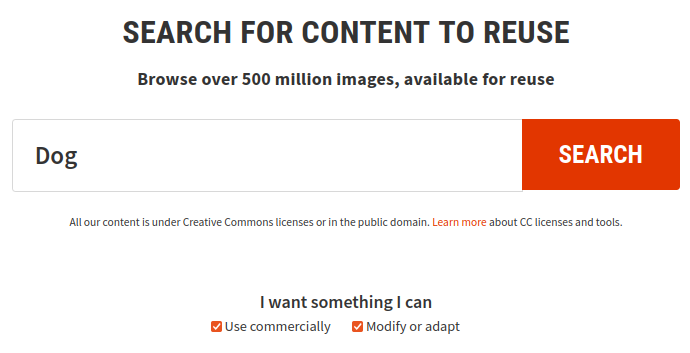
<p align="justify">Để sử dụng công cụ này, bạn cần gõ cụm từ tìm kiếm bằng tiếng Anh. Điểm mạnh của công cụ này là các hình ảnh kết quả tìm kiếm đều mang giấy phép mở Creative Commons. Tuy nhiên, để phù hợp với yêu cầu của cuộc thi, bạn sẽ cần sử dụng bộ lọc của công cụ để chỉ nhận về các kết quả tìm kiếm mang các giấy phép phù hợp, cụ thể là CC BY, CC BY-SA và CC0, như được nêu ở phần trên. Các bước tìm kiếm bằng công cụ này như sau:</p>

<div class="image-center"><img alt="" height="353" src="https://letrungnghia.mangvn.org/uploads/letrungnghia/news/2021/h1_2.png" width="690" /></div>

<p align="center">Hình 1. Công cụ tìm kiếm Creative Commons</p>

<ol>
	<li>
	<p align="justify">Đi tới địa chỉ của công cụ tìm kiếm: <a href="https://search.creativecommons.org/">https://search.creativecommons.org/</a></p>
	</li>
	<li>
	<p align="justify">Gõ cụm từ cần tìm kiếm bằng tiếng Anh, ví dụ từ ‘<i><span style="font-weight: normal">Dog</span></i>’ như trên Hình 1.</p>
	</li>
	<li>
	<p align="justify">Lọc các giấy phép. Để phù hợp với yêu cầu cuộc thi, bạn cần chọn cả 2 ô vuông nhỏ bên dưới của công cụ đó, như trên Hình 1.</p>
	</li>
	<li>
	<p align="justify">Nhấn ‘<i>SEARCH</i>’ để tiến hành tìm kiếm.</p>
	</li>
	<li>
	<p align="justify">Chọn ảnh để tải về cùng với các thông tin thừa nhận ghi công tác giả.</p>
	</li>
</ol>

<p align="center"><a href="https://youtu.be/PbnlignvUkM">Xem đoạn video hướng dẫn</a>.</p>

<p align="justify"><br />
<i><b>B</b></i><i><b>2</b></i><i><b>. Sử dụng công cụ tìm kiếm ảnh </b></i><i><b>Google Images</b></i></p>

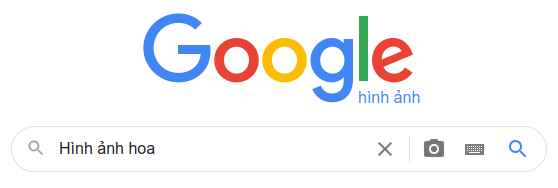
<p align="justify" style="margin-bottom: 0.2cm; font-weight: normal">Điểm mạnh của công cụ này là cho phép bạn tìm kiếm bằng tiếng Việt. Tuy nhiên, bạn sẽ phải lọc và kiểm tra giấy phép của từng hình ảnh bạn muốn tải về để đáp ứng yêu cầu giấy phép của cuộc thi và không vi phạm bản quyền. Các bước tìm kiếm là:</p>

<div class="image-center"><img alt="" height="188" src="https://letrungnghia.mangvn.org/uploads/letrungnghia/news/2021/h2_1.png" width="558" /></div>

<p align="center" style="margin-bottom: 0.2cm"><span style="font-weight: normal">Hình 2. Công cụ tìm kiếm hình ảnh của Google</span></p>

<ol>
	<li>
	<p align="justify" style="margin-bottom: 0.2cm">Đi tới địa chỉ của công cụ tại: <a href="https://images.google.com/">https://images.google.com/</a></p>
	</li>
	<li>
	<p align="justify" style="margin-bottom: 0.2cm">Gõ cụm từ cần tìm kiếm bằng ngôn ngữ bất kỳ, có thể bằng tiếng Việt, ví dụ cụm từ ‘<i><span style="font-weight: normal">Hình ảnh hoa</span></i>’ như trên Hình 2, rồi nhấn phím <i>Enter</i> để tìm kiếm.</p>
	</li>
	<li>
	<p align="justify" style="margin-bottom: 0.2cm">Ở màn hình kết quả, hãy nhấn vào núm ‘<i>Công cụ</i>’ (Tools) rồi mở combo ‘<i>Quyền sử dụng</i>’ (Usage Right), chọn ‘<i>Giấy phép Creative Commons</i>’ (Creative Commons Licenses). Công cụ sẽ lọc ra các hình ảnh mang các giấy phép Creative Commons khác nhau.</p>
	</li>
	<li>
	<p align="justify" style="margin-bottom: 0.2cm">Kiểm tra từng tệp hình ảnh bạn muốn tải về với các giấy phép đáp ứng yêu cầu đầu bài, cụ thể chỉ với các giấy phép CC BY, CC BY-SA, và CC0. Bước này là quan trọng và bạn cần phải nhớ làm.</p>
	</li>
	<li>
	<p align="justify" style="margin-bottom: 0.2cm">Chọn ảnh để tải về cùng với các thông tin thừa nhận ghi công tác giả.</p>
	</li>
</ol>

<p style="margin-bottom: 0.2cm; text-align: center;"><a href="https://youtu.be/oF54uqeDStY">Xem đoạn video hướng dẫn</a>.</p>

<p align="justify" style="margin-bottom: 0.2cm"><br />
<b>C</b><b>. </b><b>Cách</b><b> tìm kiếm và t</b><b>ải </b><b>về</b><b> các </b><b>tệp </b><b>video</b></p>

<p align="justify"><span style="font-weight: normal">Có vài cách để </span><span style="font-weight: normal">tìm kiếm và</span><span style="font-weight: normal"> tải </span><span style="font-weight: normal">về</span><span style="font-weight: normal"> </span><span style="font-weight: normal">một tệp video</span><span style="font-weight: normal"> từ Internet để </span><span style="font-weight: normal">sử dụng và</span><span style="font-weight: normal"> tuân thủ yêu cầu về các giấy phép của cuộc thi. </span></p>

<p align="justify"><i><b>C1. Tìm kiếm và tải về các video trên YouTube</b></i></p>

<p align="justify"><span style="font-weight: normal">Điểm mạnh là có thể tìm kiếm bằng tiếng Việt trên YouTube, và video trên YouTube một khi được cấp giấy phép Creative Commons, thì chắc chắn </span><span style="font-weight: normal">là nó mang giấy phép</span><span style="font-weight: normal"> CC BY. </span><span style="font-weight: normal">Các bước tìm kiếm là như sau: </span></p>

<div class="image-center"><img alt="" height="365" src="https://letrungnghia.mangvn.org/uploads/letrungnghia/news/2021/h3_1.png" width="781" /></div>

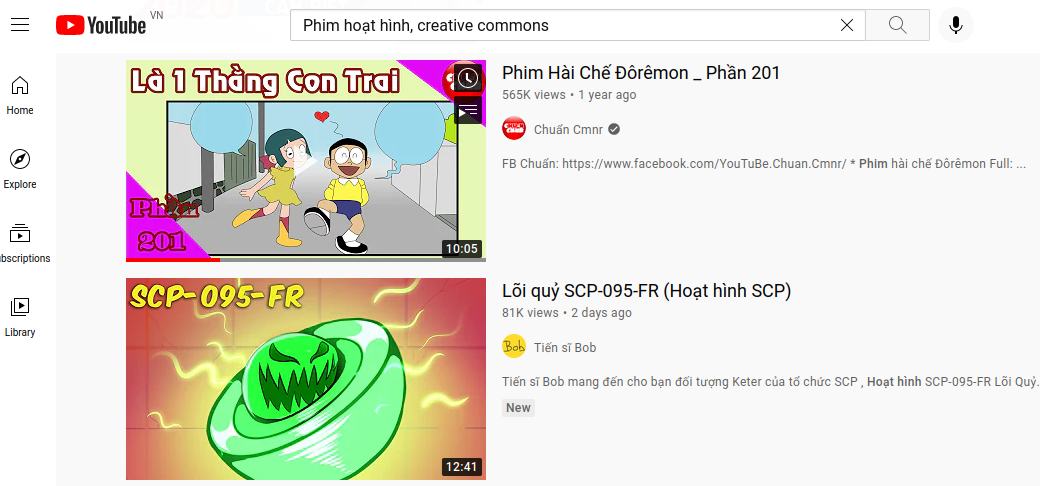
<p align="center" style="font-weight: normal">Hình 3. Tìm kiếm video mang giấy phép Creative Commons trên YouTube</p>

<ol>
	<li>
	<p align="justify"><span style="font-weight: normal">Đi </span><span style="font-weight: normal">tới địa chỉ của YouTube: <a href="https://www.youtube.com/">https://www.youtube.com/</a> </span></p>
	</li>
	<li>
	<p align="justify"><span style="font-weight: normal">Để tìm kiếm video mang giấy phép Creative Commons, cú pháp tìm kiếm như sau: &#91;</span><i><span style="font-weight: normal">cụm từ cần tìm kiếm</span></i><span style="font-weight: normal">&#93; cộng với &#91;</span><i><span style="font-weight: normal">dấu phẩy</span></i><span style="font-weight: normal">&#93; cộng với cụm từ &#91;</span><i><span style="font-weight: normal">Creative Commons</span></i><span style="font-weight: normal">&#93;. Ví dụ, bạn cần tìm các phim hoạt hình mang giấy phép Creative Commons, hãy gõ như trên Hình 3: </span><i><span style="font-weight: normal">‘Phim hoạt hình, creative commons‘ </span></i><span style="font-style: normal"><span style="font-weight: normal">rồi nhấn phím </span></span><i><span style="font-weight: normal">Enter</span></i><span style="font-style: normal"><span style="font-weight: normal"> để tìm kiếm. </span></span></p>
	</li>
	<li>
	<p align="justify"><span style="font-style: normal"><span style="font-weight: normal">C</span></span><span style="font-style: normal"><span style="font-weight: normal">họn video bạn định tải về. Kiểm tra giấy phép của nó bằng cách nhấn vào cụm từ ‘</span></span><i><span style="font-weight: normal">SHOW MORE</span></i><span style="font-style: normal"><span style="font-weight: normal">’ bên dưới phần mô tả video đó. Nếu thấy có cụm từ cùng đường liên kết dẫn tới giấy phép Creative Commons như sau sẽ là đúng: <a href="https://creativecommons.org/licenses/by/4.0/">https://creativecommons.org/licenses/…</a> vì khi nhấn vào đường liên kết đó, bạn sẽ nhìn thấy nội dung giấy phép CC BY. Trường hợp không có cụm từ đó, hoặc có cụm từ đó nhưng không có đường liên kết tới giấy phép, </span></span><span style="font-style: normal"><span style="font-weight: normal">hãy</span></span><span style="font-style: normal"><span style="font-weight: normal"> bỏ video đó.</span></span></p>
	</li>
	<li>
	<p align="justify" style="font-style: normal; font-weight: normal">Sao chép các thông tin thừa nhận ghi công tác giả. Tối thiểu, các thông tin thừa nhận ghi công tác giả gồm: (1) Tên tác phẩm; (2) Tác giả hoặc các tác giả; (3) Đường liên kết để có thể tải về tệp nội dung đó; (4) Tên của giấy phép và đường liên kết dẫn tới giấy phép đó.</p>
	</li>
	<li>
	<p align="justify"><span style="font-style: normal"><span style="font-weight: normal">Tải video đó về. Có thể sử dụng, ví dụ trên trình duyệt Firefox, các </span></span><span style="font-style: normal"><span style="font-weight: normal">trình bổ sung (</span></span><span style="font-style: normal"><span style="font-weight: normal">Add-Ons</span></span><span style="font-style: normal"><span style="font-weight: normal">)</span></span><span style="font-style: normal"><span style="font-weight: normal"> như Video DownloadHelper, Video Downloader Professional, Video Downloader hoặc </span></span><span style="font-style: normal"><span style="font-weight: normal">nhiều</span></span><span style="font-style: normal"><span style="font-weight: normal"> trình Add-Ons </span></span><span style="font-style: normal"><span style="font-weight: normal">khác</span></span><span style="font-style: normal"><span style="font-weight: normal"> để tải video về từ Internet.</span></span></p>
	</li>
</ol>

<p style="text-align: center;"><a href="https://youtu.be/xq5a-l1f_Rs">Xem đoạn video hướng dẫn</a>.</p>

<p align="justify"><br />
<i><b>C2. Tìm kiếm và tải về các video trên Vimeo Creative Commons</b></i><span style="font-weight: normal"> </span></p>

<p align="justify"><span style="font-weight: normal">T</span><span style="font-weight: normal">rên Vimeo Creative Commons bạn có thể thấy các video với tất cả các loại giấy phép Creative Commons cùng các video không có các giấy phép Creative Commons. Các giấy phép CC BY và CC BY-SA là 2 trong số 6 giấy phép Creative Commons tiêu chuẩn, bên cạnh giấy phép Creative Commons đăc biệt, là CC0. </span><span style="font-weight: normal">Trên Vimeo Creative Commons</span><span style="font-weight: normal">, bạn không </span><span style="font-weight: normal">sử dụng tiếng Việt để tìm kiếm, mà dùng tiếng Anh. </span></p>

<p align="justify"><span style="font-weight: normal">Để </span><span style="font-weight: normal">tải về tệp video trên Vimeo Creative Commons, bạn phải mở tài khoản trên nó. </span></p>
<div class="image-center"><img alt="" height="268" src="https://letrungnghia.mangvn.org/uploads/letrungnghia/news/2021/h4_1.png" width="780" /></div>

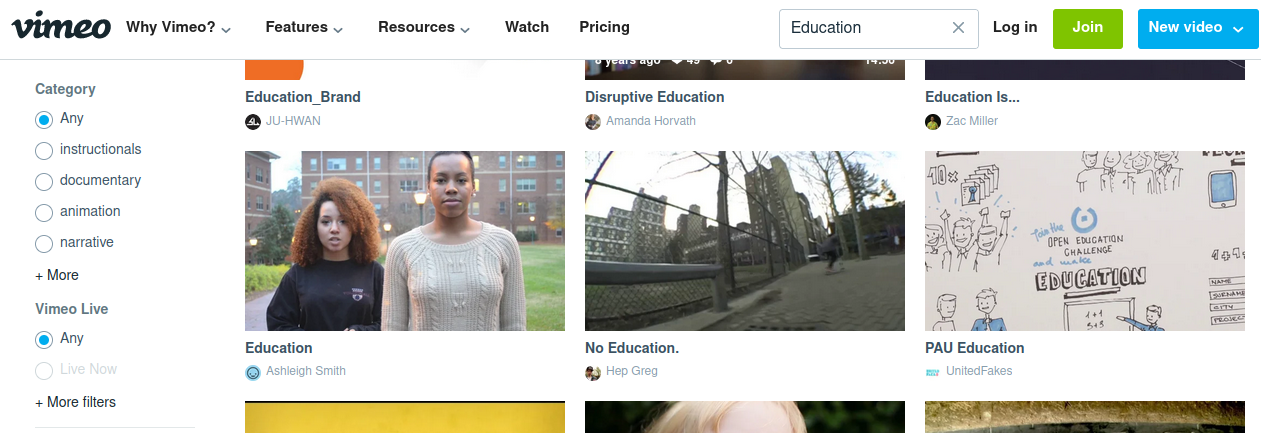
<p align="center"><span style="font-weight: normal">Hình 4. </span><span style="font-weight: normal">Tìm kiếm video </span><span style="font-weight: normal">trên Vimeo Creative Commons</span></p>

<p align="justify" style="font-weight: normal">Để tìm kiếm và tải về video mang giấy phép tuân thủ yêu cầu cuộc thi, làm như sau:</p>

<ol>
	<li>
	<p align="justify"><span style="font-weight: normal">Đi tới trang Vimeo Creative Commons: <a href="https://vimeo.com/creativecommons">https://vimeo.com/creativecommons</a> </span></p>
	</li>
	<li>
	<p align="justify"><span style="font-weight: normal">Gõ cụm từ cần tìm kiếm bằng tiếng Anh, </span><span style="font-weight: normal">ví dụ, ‘</span><i><span style="font-weight: normal">Education</span></i><span style="font-weight: normal">’ như trên Hình 4. </span><span style="font-weight: normal"> </span></p>
	</li>
	<li>
	<p align="justify"><span style="font-weight: normal">Nhấn vào cụm từ ‘</span><i><span style="font-weight: normal">+More filters</span></i><span style="font-weight: normal">’ (nhiều bộ lọc hơn) nằm ở bên trái màn hình, bên dưới phần ‘Category’ (chủng loại) để mở ra tất cả các bộ lọc có trên Vimeo Creative Commons. </span></p>
	</li>
	<li>
	<p align="justify" style="font-weight: normal">Tiến hành lọc các video, có thể theo trật tự sau đây:</p>

	<ol type="a">
		<li>
		<p align="justify"><span style="font-weight: normal">Lọc với bộ lọc ‘</span><i><span style="font-weight: normal">Price</span></i><span style="font-weight: normal">’ (Giá thành). Ví dụ, chọn ‘</span><i><span style="font-weight: normal">Free</span></i><span style="font-weight: normal">’ (Không mất tiền). Hành động này sẽ loại bỏ tất cả các video phải mất tiền </span><span style="font-weight: normal">mua</span><span style="font-weight: normal">. </span></p>
		</li>
		<li>
		<p align="justify"><span style="font-weight: normal">Lọc với bộ lọc ‘</span><i><span style="font-weight: normal">License</span></i><span style="font-weight: normal">’ (Giấy phép). Hãy chọn một trong các giấy phép CC BY, CC BY-SA hoặc CC0 để đáp ứng yêu cầu cuộc thi. </span><span style="font-weight: normal">Khuyến cáo chọn CC BY. </span></p>
		</li>
	</ol>
	</li>
	<li>
	<p align="justify"><span style="font-style: normal"><span style="font-weight: normal">Sao chép các thông tin thừa nhận ghi công tác giả. </span></span><span style="font-style: normal"><span style="font-weight: normal">Khi xem video từ Vimeo Creative Commons, hãy nhấ</span></span><span style="font-style: normal"><span style="font-weight: normal">n</span></span><span style="font-style: normal"><span style="font-weight: normal"> vào từ ‘</span></span><i><span style="font-weight: normal">More</span></i><span style="font-style: normal"><span style="font-weight: normal">’ ở bên dưới video đó để có được các thông tin thừa nhận ghi công cho (các) tác giả của video. </span></span><span style="font-style: normal"><span style="font-weight: normal">Rồi tải video về.</span></span></p>
	</li>
</ol>

<p style="text-align: center;"><a href="https://youtu.be/CD0pmRImoLI">Xem đoạn video hướng dẫn</a>.</p>

<p align="justify"><br />
<b>D. Cách tìm kiếm và tải về các tệp audio (âm thanh, tiếng nói .v.v.)</b></p>

<p align="justify" style="font-weight: normal">Người học nhiều khả năng sẽ thấy thích thú học các bài giảng bằng video nếu video đó không chỉ có lời giảng bài của giảng viên, mà còn có, ví dụ, cả âm thanh của các bản nhạc nền xen kẽ các lời giảng đó. Trên Internet có các kho chứa các tệp âm thanh giúp bạn làm được điều này trong khi vẫn đảm bảo tuân thủ các yêu cầu về giấy phép của cuộc thi cũng như tôn trọng bản quyền.</p>

<p align="justify"><i><b>D1. Tìm kiếm và tải về các tệp audio trên YouTube</b></i></p>

<p align="justify" style="font-weight: normal">Bạn cần có tài khoản thư điện tử của Google để làm được việc này.</p>

<div class="image-center"><img alt="" height="325" src="https://letrungnghia.mangvn.org/uploads/letrungnghia/news/2021/h5_1.png" width="780" /></div>

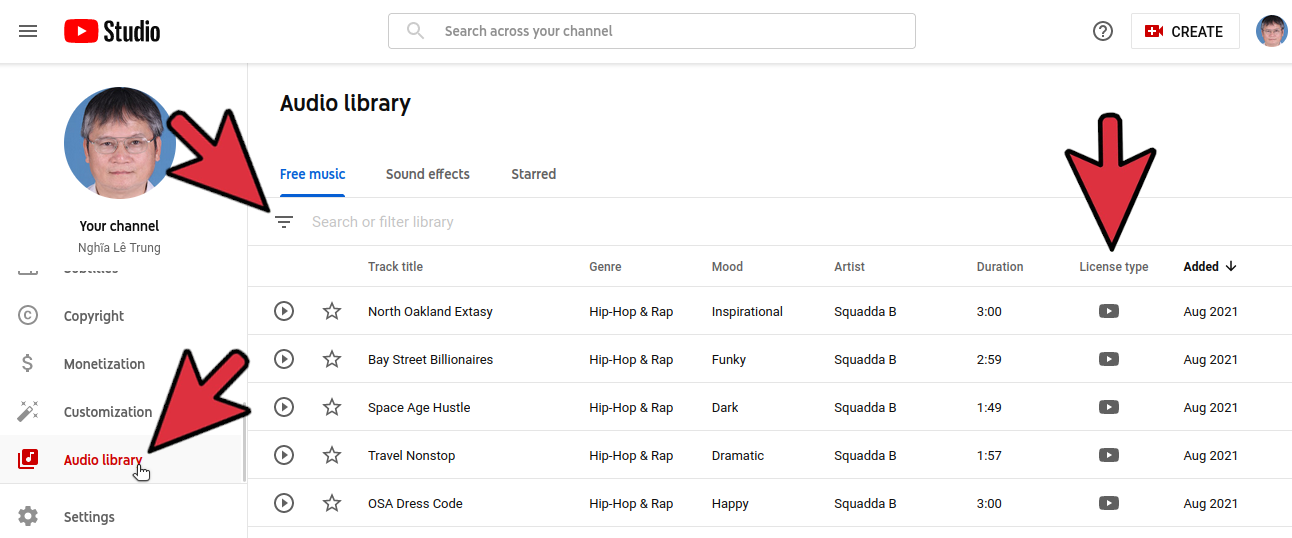
<p align="center" style="font-weight: normal">Hình 5. Màn hình thư viện âm thanh (Audio Library) của YouTube</p>

<ol>
	<li value="1">
	<p align="justify" style="font-weight: normal">Đi tới địa chỉ của YouTube: <a href="https://www.youtube.com/">https://www.youtube.com/</a></p>
	</li>
	<li>
	<p align="justify" style="font-weight: normal">Nhấn vào avatar của bạn ở góc phải trên cùng màn hình, chọn YouTube Studio (thứ 3 từ trên xuống). Cửa sổ màn hình YouTube Studio sẽ mở ra.</p>
	</li>
	<li>
	<p align="justify" style="font-weight: normal">Bên trái cùng của màn hình YouTube Studio, nơi bạn nhìn thấy avatar lớn của mình, hãy sử dụng con trượt bên dưới bảng điều khiển (<i>Dashboard</i>) để trượt xuống phía dưới cùng, và bạn sẽ nhìn thấy dòng ‘<i>Audio Library</i>’ (Thư viện âm thanh), hãy nhấn vào nó để mở ra màn hình thư viện âm thanh như ở Hình 5.</p>
	</li>
	<li>
	<p align="justify"><span style="font-weight: normal">Lọc các tệp âm thanh có giấy phép CC BY (giấy phép Creative Commons duy nhất có trong thư viện âm thanh của YouTube và phù hợp với yêu cầu về giấy phép của cuộc thi) bằng cách nhấn vào hình tam giác </span><span style="font-weight: normal">nằm ngay</span><span style="font-weight: normal"> bên dưới </span><span style="font-weight: normal">cụm từ ‘</span><i><span style="font-weight: normal">Free music</span></i><span style="font-weight: normal">’ (Nhạc tự do không mất tiền) rồi chọn lựa chọn nằm dưới cùng ‘</span><i><span style="font-weight: normal">Attribution Required</span></i><span style="font-weight: normal">’ (Yêu cầu thừa nhận ghi công) để mở ra màn hình các tệp âm thanh mang giấy phép CC BY trong thư viện âm thanh của YouTube. Bạn sẽ nhìn thấy ở cột ‘</span><i><span style="font-weight: normal">License type</span></i><span style="font-weight: normal">’ (Dạng giấy phép) các biểu tượng giấy phép Creative Commons (CC) cho tất cả các tệp âm thanh, mỗi tệp một dòng. </span></p>
	</li>
	<li>
	<p align="justify"><span style="font-weight: normal">Nghe thử </span><span style="font-weight: normal">và</span><span style="font-weight: normal"> tải về tệp âm thanh bạn thích và nhớ tải về cả các thông tin thừa nhận ghi công tác giả. </span></p>
	</li>
</ol>

<p align="center" style="font-weight: normal"><a href="https://youtu.be/9jYN8g8XgDo">Xem đoạn video hướng dẫn</a>.</p>

<p style="font-weight: normal; text-align: justify;">&nbsp;</p>

<p align="justify"><i><b>D</b></i><i><b>2</b></i><i><b>. Tìm kiếm và tải về các </b></i><i><b>tệp</b></i><i><b> audio trên </b></i><i><b>MusOpen</b></i></p>

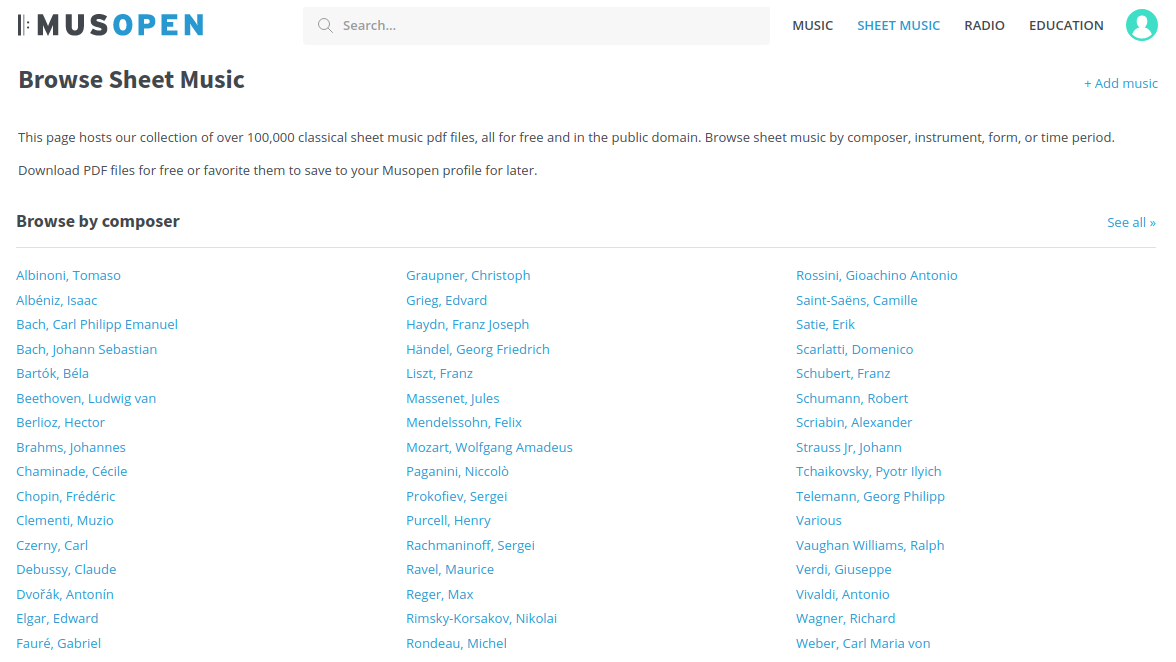
<p align="justify" style="font-weight: normal">Đây là trang có hơn 100.000 bản nhạc cổ điển nằm trong phạm vi công cộng mà bạn có thể tự do không mất tiền để tải về mà không cần phải tạo ra tài khoản trên trang. Tuy nhiên, để tải về các bản ghi âm trên MusOpen, bạn phải mở một tài khoản trên nó. Các bước tìm kiếm để tải về sử dụng các tệp đó như sau:</p>

<div class="image-center"><img alt="" height="439" src="https://letrungnghia.mangvn.org/uploads/letrungnghia/news/2021/h6_1.png" width="780" /></div>

<p align="center" style="font-weight: normal">Hình 6. Màn hình các bản nhạc và bản ghi âm của MusOpen</p>

<ol>
	<li>
	<p align="justify"><span style="font-weight: normal">Đi </span><span style="font-weight: normal">tới trang MusOpen: <a href="https://musopen.org/">https://musopen.org/</a>. Trượt xuống bên dưới rồi nhấn vào biểu tượng ‘</span><i><span style="font-weight: normal">Sheet Music</span></i><span style="font-weight: normal">’ (Bản nhạc) để mở ra trang duyệt các bản nhạc </span><span style="font-weight: normal">(</span><i><span style="font-weight: normal">Sheet musics</span></i><span style="font-weight: normal">)</span><span style="font-weight: normal"> và các bản ghi âm </span><span style="font-weight: normal">(</span><i><span style="font-weight: normal">Recordings</span></i><span style="font-weight: normal">)</span><span style="font-weight: normal"> như trên Hình 6. </span><span style="font-weight: normal">Trên trang này, bạn có thể duyệt tìm các bản nhạc và bản ghi âm theo: (1) </span><i><span style="font-weight: normal">Browse by composer</span></i><span style="font-weight: normal"> (Duyệt theo nhà soạn nhạc); (2) </span><i><span style="font-weight: normal">Browse by instrument</span></i><span style="font-weight: normal"> (Duyệt theo nhạc cụ); (3) </span><i><span style="font-weight: normal">Browse by period</span></i><span style="font-weight: normal"> (Duyệt theo giai đoạn âm nhạc</span><span style="font-weight: normal">)</span><span style="font-weight: normal">; và (4) </span><i><span style="font-weight: normal">Browse by form</span></i><span style="font-weight: normal"> (Duyệt theo kiểu nhạc). </span><span style="font-weight: normal">Việc duyệt theo cách nào từ 4 cách trên cũng đều như nhau về mặt </span><span style="font-weight: normal">thủ tục</span><span style="font-weight: normal">. Vì vậy bên dưới đây sẽ nêu ví dụ với việc duyệt theo nhà soạn nhạc; duyệt </span><span style="font-weight: normal">theo những điều còn lại là tương tự</span><span style="font-weight: normal">. </span></p>
	</li>
	<li>
	<p align="justify" style="font-weight: normal">Duyệt theo nhà soạn nhạc. Ví dụ, bạn chọn nhà soạn nhạc ‘<i>Beethoven, Ludwig van</i>’ bằng cách nhấn vào tên của ông ta để mở trang của nhà soạn nhạc đó. Trên trang của ông, bạn có thể chọn một bản nhạc, ví dụ bản ‘<i>Beethoven Bagatelle no. 25 &#039;&#039;Für Elise&#039;&#039;, WoO 59</i>’. Bạn sẽ nhìn thấy các lựa chọn bản nhạc và bản ghi âm khác nhau của nó (6 lựa chọn cho bản nhạc và 2 lựa chọn cho bản ghi âm, trong trường hợp cụ thể này). Nhấn núm &#039;Download Sheet Music&#039; để tải bản nhạc về.</p>
	</li>
	<li>
	<p align="justify"><span style="font-weight: normal">Hãy kiểm tra giấy phép của lựa chọn bản ghi âm (các tệp âm thanh) phù hợp với yêu cầu của cuộc thi. Ví dụ, bạn có thể tải về bản ghi âm với nhạc công (cột </span><i><span style="font-weight: normal">Performer</span></i><span style="font-weight: normal">) là vô danh (</span><i><span style="font-weight: normal">Anonymous</span></i><span style="font-weight: normal">) vì nó có giấy phép phù hợp với yêu cầu của cuộc thi, cụ thể ở đây là ‘</span><i><span style="font-weight: normal">CC PD</span></i><span style="font-weight: normal">’ ở cột License (Giấy phép). Chữ ‘</span><i><span style="font-weight: normal">PD</span></i><span style="font-weight: normal">’ là từ viết tắt tiếng Anh của ‘</span><i><span style="font-weight: normal">Public Domain</span></i><span style="font-weight: normal">’ (Phạm vi công cộng), tương ứng với giấy phép CC0 được nêu vài lần ở trên. </span></p>
	</li>
	<li>
	<p align="justify"><span style="font-weight: normal">N</span><span style="font-weight: normal">ghe thử và tải tệp âm thanh đó về bằng cách nhấn vào mũi tên ở dòng tương ứng bên dưới cột ‘</span><i><span style="font-weight: normal">Download</span></i><span style="font-weight: normal">’ (Tải về). Vì tệp này nằm trong phạm vi công cộng và nhạc công là vô danh, bạn </span><span style="font-weight: normal">không phải thừa nhận ghi công cho tác giả</span><span style="font-weight: normal">. </span></p>
	</li>
</ol>

<p align="center"><a href="https://youtu.be/OTDEwOhMPcY">Xem đoạn video hướng dẫn</a>.</p>

<p align="justify"><br />
<span style="font-weight: normal">N</span><span style="font-weight: normal">goài các gợi ý trong bài này, các thí sinh có thể tham khảo thêm phần cấp phép mở cho video dự thi&#91;</span><span style="font-weight: normal">2&#93; hoặc </span><span style="font-weight: normal"><a href="https://youtu.be/_HHfOEv3em0">xem đoạn video hướng dẫn</a>.</span></p>

<p align="justify"><span style="font-weight: normal">Hy </span><span style="font-weight: normal">vọng với các </span><span style="font-weight: normal">gợi ý </span><span style="font-weight: normal">và các đoạn video hướng dẫn </span><span style="font-weight: normal">trong bài này, các thí sinh tham dự cuộc thi sẽ có được các video bài giảng như ý. </span><span style="font-weight: normal">Chúc các thí sinh thành công!</span></p>

<p align="justify"><b>C</b><b>hú giải: </b></p>

<p align="justify" style="margin-left: 0.8cm; text-indent: -0.8cm; line-height: 115%; background: transparent; page-break-before: auto"><span style="font-weight: normal">&#91;1&#93; </span><span style="font-weight: normal">Quyết định số 2915/QĐ-BGDĐT ngày 17/09/2021 của Bộ Giáo dục và Đào tạo Về việc ban hành Thể lệ cuộc thi Thiết kế bài giảng điện tử: <a href="https://images.giaoducthoidai.vn/public/nhungnt/2021-09-17/2915-qd-bgddt-the-le-cuoc-thi-e-learning.pdf">https://images.giaoducthoidai.vn/public/nhungnt/2021-09-17/2915-qd-bgddt-the-le-cuoc-thi-e-learning.pdf</a></span></p>

<p align="justify" style="margin-left: 0.8cm; text-indent: -0.8cm; line-height: 115%; background: transparent"><span style="font-weight: normal">&#91;2&#93; Lê Trung Nghĩa, 2016: </span><i><span style="font-weight: normal">Hiểu cho đúng quy định giấy phép Creative Commons trong Quyết định số 1878/QĐ-BGDĐT ngày 02/06/2016 về việc ban hành thể lệ cuộc thi quốc gia thiết kế bài giảng e-Learning lần thứ 4 của Bộ Giáo dục và Đào tạo</span></i><span style="font-weight: normal">: <a href="https://letrungnghia.mangvn.org/Education/hieu-cho-dung-quy-dinh-giay-phep-creative-commons-trong-quyet-dinh-so-1878-qd-bgddt-ngay-02-06-2016-ve-viec-ban-hanh-the-le-cuoc-thi-quoc-gia-thiet-ke-bai-giang-e-learning-lan-thu-4-cua-bo-giao-duc-va-dao-tao-5544.html">https://letrungnghia.mangvn.org/Education/hieu-cho-dung-quy-dinh-giay-phep-creative-commons-trong-quyet-dinh-so-1878-qd-bgddt-ngay-02-06-2016-ve-viec-ban-hanh-the-le-cuoc-thi-quoc-gia-thiet-ke-bai-giang-e-learning-lan-thu-4-cua-bo-giao-duc-va-dao-tao-5544.html</a></span><br />
&nbsp;</p>

<p align="justify" style="font-weight: normal"><img alt="" height="35" src="https://letrungnghia.mangvn.org/uploads/letrungnghia/news/2021/cc-by-logo_4.png" width="100" /></p>

<p align="justify"><span style="font-weight: normal">Giấy phép nội dung: <a href="https://creativecommons.org/licenses/by/4.0/">CC BY 4.0 Quốc tế</a> </span></p>

<p align="justify"><b>Lê Trung Nghĩa </b><br />
<br />
&nbsp;</p>

<p align="justify"><b>Xem thêm</b><span style="font-weight: normal">: <a href="https://letrungnghia.mangvn.org/Author/thua-nhan-ghi-cong-tac-gia-va-ket-hop-cac-tai-nguyen-mo-voi-cac-giay-phep-creative-commons-khac-nhau-khi-thiet-ke-video-bai-giang-dien-tu-2021-6727.html">Thừa nhận ghi công tác giả và kết hợp các tài nguyên mở với các giấy phép Creative Commons khác nhau khi thiết kế video bài giảng điện tử 2021</a></span></p>
		</div>
	</div>
	<div id="footer" class="clearfix">
		<div id="url">
			<strong>URL của bản tin này: </strong><a href="https://letrungnghia.mangvn.org/savefile/Author/vai-goi-y-cho-cac-thi-sinh-du-thi-bai-giang-dien-tu-2021-6726.html" title="Vài gợi ý cho các thí sinh dự thi bài giảng điện tử 2021">https://letrungnghia.mangvn.org/savefile/Author/vai-goi-y-cho-cac-thi-sinh-du-thi-bai-giang-dien-tu-2021-6726.html</a>

		</div>
		<div class="clear"></div>
		<div class="copyright">
			&copy; Blog FOSS by Lê Trung Nghĩa
		</div>
		<div id="contact">
			<a href="mailto:webmaster@vinades.vn">webmaster@vinades.vn</a>
		</div>
	</div>
</div>
        <div id="timeoutsess" class="chromeframe">
            Bạn đã không sử dụng Site, <a onclick="timeoutsesscancel();" href="https://letrungnghia.mangvn.org/#">Bấm vào đây để duy trì trạng thái đăng nhập</a>. Thời gian chờ: <span id="secField"> 60 </span> giây
        </div>
        <div id="openidResult" class="nv-alert" style="display:none"></div>
        <div id="openidBt" data-result="" data-redirect=""></div>
<div id="run_cronjobs" style="visibility:hidden;display:none;"><img alt="cron" src="/index.php?second=cronjobs&amp;p=l54NRlpO" width="1" height="1" /></div>
<script src="https://letrungnghia.mangvn.org/assets/js/jquery/jquery.min.js"></script>
<script>var nv_base_siteurl="/",nv_lang_data="vi",nv_lang_interface="vi",nv_name_variable="nv",nv_fc_variable="op",nv_lang_variable="language",nv_module_name="news",nv_func_name="savefile",nv_is_user=0, nv_my_ofs=7,nv_my_abbr="+07",nv_cookie_prefix="nv4c_Cgoz2",nv_check_pass_mstime=1738000,nv_area_admin=0,nv_safemode=0,theme_responsive=1,nv_recaptcha_ver=2,nv_recaptcha_sitekey="6LcNwC8UAAAAAMm8ZTYNygweLUQtOU0IapbDRk69",nv_recaptcha_type="image",XSSsanitize=1;</script>
<script src="https://letrungnghia.mangvn.org/assets/js/language/vi.js"></script>
<script src="https://letrungnghia.mangvn.org/assets/js/DOMPurify/purify3.js"></script>
<script src="https://letrungnghia.mangvn.org/assets/js/global.js"></script>
<script src="https://letrungnghia.mangvn.org/assets/js/site.js"></script>
<script src="https://letrungnghia.mangvn.org/themes/default/js/news.js"></script>
<script src="https://letrungnghia.mangvn.org/themes/default/js/main.js"></script>
<script src="https://letrungnghia.mangvn.org/themes/default/js/custom.js"></script>
<script type="application/ld+json">
        {
            "@context": "https://schema.org",
            "@type": "Organization",
            "url": "https://letrungnghia.mangvn.org",
            "logo": "https://letrungnghia.mangvn.org/uploads/letrungnghia/le-trung-nghia.png"
        }
        </script>
<script src="https://letrungnghia.mangvn.org/themes/default/js/bootstrap.min.js"></script>
</body>
</html>